第六章第一节已经介绍过最常用的标点符号,本章则进一步分门别类地介绍其他符号,并尽可能为其设置合理的编码。这些符号虽然使用频率不高,但还是有被用到的可能,所以不能没有。注意,本章所列符号无论数量还是归类方法都有一定限制,并未涵盖大家能见到的所有符号。
配对符号共设置了 20 对(包括已经学过的 5 对),其编码具有一定规律。
Chapter 6, Section 1 has already introduced the most commonly used punctuation marks. This chapter proceeds to introduce other symbols, assigning them consistent outlines wherever feasible. Although these symbols are not frequently used, they may still be useful on occasion. Note that the symbols listed here are subject to certain limitations and do not cover every symbol one might encounter.
There are 20 pairs of paired punctuation, including 5 already covered previously:
| 名称 Name | 全角 Full-width |
半角 Half-width |
成对录入编码 Paired outline |
分开录入编码 Separate outlines |
|
|---|---|---|---|---|---|
| 双引号 double quotation marks | “ ” | LN:yin | LN:F | LN:L |
|
| 单引号 single quotation marks | ‘ ’ | LN:dan | LN:IF | LN:IL |
|
| 二角双引号 double corner brackets | 『 』 | LN:er | LN:BIF | LN:BIL |
|
| 二角单引号 single corner brackets | 「 」 | LN:jiao | LN:DIF | LN:DIL |
|
| 斜引号 double-prime quotation marks | 〝 〞 | LN:xie | LN:BDF | LN:BDL |
|
| 双书名号 double title marks | 《 》 | LN:shu | LN:R | LN:H |
|
| 单书名号 single title marks | 〈 〉 | LN:ming | LN:IR | LN:IH |
|
| 矮双书名号 double guillemets | « » | LN:BIR | LN:BIH |
||
| 矮单书名号 single guillemets | ‹ › | LN:DIR | LN:DIH |
||
| 尖括号 angle brackets | < > | LN:jian | LN:DR | LN:DH |
|
| 六角括号 tortoise shell brackets | 〔 〕 | LN:liu | LN:RF | LN:HL |
|
| 矮六角括号 small tortoise shell brackets | ﹝ ﹞ | LN:ai | LN:IRF | LN:IHL |
|
| 黑体方头括号 black lenticular brackets | 【 】 | LN:hei | LN:BRF | LN:BHL |
|
| 空心方头括号 white lenticular brackets | 〖 〗 | LN:kong | LN:DRF | LN:DHL |
|
| 大括号 half-width curly brackets | { } | LN:da | LN:DF1 | LN:DL1 |
|
| 花括号 full-width curly brackets | { } | LN:hua | LN:DF2 | LN:DL2 |
|
| 中括号 half-width square brackets | [ ] | LN:zhong | LN:BF1 | LN:BL1 |
|
| 方括号 full-width square brackets | [ ] | LN:fang | LN:BF2 | LN:BL2 |
|
| 小括号 half-width parentheses | ( ) | LN:xiao | LN:BR | LN:BH |
|
| 圆括号 full-width parentheses | ( ) | LN:yuan | LN:IB | LN:ID |
|
配对符号的特点如下:
LNPaired punctuation has the following characteristics:
LN:.一般符号共设置 40 个:
There are 40 general symbols:
| 名称 Name | 半角 Half-width |
全角 Full-width |
编码 Outline |
名称 Name | 半角 Half-width |
全角 Full-width |
编码 Outline |
|---|---|---|---|---|---|---|---|
| 正号 positive | + | + | :zheng |
平方米 square metre | ㎡ | :ping |
|
| 负号 negative | - | - | :fu |
立方米 cubed | ³ | :fang |
|
| 加号 plus | + | + | :jia |
角度 degrees | ° | :du |
|
| 减号 minus | - | - | :jian |
摄氏度 degrees Celsius | ℃ | :she |
|
| 乘号 multiply | * | × | :cheng |
华氏度 degrees Fahrenheit | ℉ | :hua |
|
| 除号 divide | / | ÷ | :chu |
对号 check mark | √ | :dui |
|
| 小于号 less than | < | < | :xiao |
错号 incorrect | × | :cuo |
|
| 大于号 greater than | > | > | :da |
叉号 cross | :cha |
||
| 等于号 equals | = | = | :deng |
约等于 approximately | ≈ | :yue |
|
| 百分号 per cent | % | % | :bai |
千分号 per mille | ‰ | :qian |
|
| 美元符 dollar sign | $ | $ | :mei |
人民币 Renminbi sign | ¥ | :ren |
|
| 点 dot | . | . | :dian |
比 ratio | ∶ | :bi |
|
| 星号 asterisk | * | ﹡ | :xing |
短破折 en dash | – | :duan |
|
| 井号 number sign | # | ﹟ | :jing |
引号 quotation mark | " | " | :yin |
| 安德 ampersand | & | ﹠ | :an |
单引号 apostrophe | ' | ' | :dan |
| 艾特 at | @ | @ | :ai |
脱字符 caret | ^ | ^ | :tuo |
| 反斜杠 backslash | \ | ﹨ | :fan |
斜杠 forward slash | / | / | :xie |
| 波浪号 tilde | ~ | ~ | :bo |
竖杠 vertical bar | | | :gang |
|
| 间隔号 middle dot | • | :ge |
下划线 underscore | _ | _ | :xian |
|
| · | :IH |
连字符 hyphen | - | :lian |
一般符号的特点如下:
General symbols have the following characteristics:
分组符号虽涵盖广泛,但录入时很麻烦,有的需要翻页好几次才能找见,非常不便。为了能够快速录入这些符号,我们专门编制了一个增补符号词库,并默认挂载到当前语境里。通过该词库,大家只要录入符号名称特征字的音节码(两字以上的只取其中最具特征的两个字),然后再录入 kei 或 kei’kei 等后缀标识音节即可快速打出想要的符号。比如:
想要录入度数 °,则只需一击即可:du’kei。
想要录入摄氏度 ℃,则只需两击即可:第一击:she’shi;第二击:kei。
想要录入右括号 ),则只需两击即可:第一击:kuo’hao;第二击:kei’ kei。
To allow rapid input of less common symbols, we also have a supplementary symbol dictionary, with which users can quickly enter symbols by writing syllables phonetically based on the key characters in the name of the symbol (for names with more than two characters, only the two most distinctive characters are selected), followed by a suffix chord :kei or kei:kei to trigger translation. For example:
The degree symbol ° can be directly written du:kei.
The degrees Celsius symbol ℃ can be directly written in two strokes: she:shi, then :kei.
The right parenthesis ) can be directly written in two strokes: kuo:hao, then kei:kei.
若某个音节对应的符号只有一个,直接加 kei’就可以了;若某个音节对应的符号有两个(比如配对符号的左右两半、某个符号既有全角又有半角) ,且想要录入的是第二个,那就加 kei’ kei。 其余还有:
If a specific syllable corresponds only to one symbol, simply add :kei to it. If, however, a syllable has two symbols, such as the left and right versions of a paired symbol, or full- and half-width forms of a symbol, and you want to write the second of those options, write kei:kei instead. Additional modifiers include:
san:kei |
第三项 third item |
si:kei |
第四项 fourth item |
wu:kei |
第五项 fifth item |
quan:kei |
全角 full-width |
ban:kei |
半角 half-width |
dan:kei |
某些符号的单层形式 single-layer form |
you:kei |
配对符号的右半边 right half of paired symbols |
等等,详见附表《增补符号》。
And more; see the Supplementary Symbols appendix.
作为一名专业速录师,在实际工作中应尽量避免双手离开速录机,这就要求速录机必须具备与普通键盘和鼠标相当或类似的功能。第六章介绍的标点符号、数字字母、空格、回车等功能,实际上就相当于速录机对普通键盘的模拟。本章则进一步系统地介绍如何用速录机完全模拟标准键盘和鼠标,以实现对各种系统功能及其快捷键的便利操作。
As a professional stenographer, you should strive to move your hands off the steno machine as little as possible while writing. This means you should also try to use the steno machine to perform tasks you would normally use a keyboard or mouse for. The commands introduced in Chapter 6, such as punctuation, numerals, letters, spaces, and the Enter key, are effectively the steno machine being used to emulate a standard keyboard. This chapter provides a systematic explanation of how to use the steno machine to fully emulate a keyboard and mouse in order to access many system tasks conveniently.
键盘模拟功能共有 19 个,除了标准键盘上的 17 个主功能,另外增加了全角空格、换行空两格等实用功能。
There are 19 outlines for keyboard emulation; in addition to 17 keys on a standard keyboard, this also includes outlines for a full-width space and a two-space line break.
| 功能 Operation |
完整编码 Full Outline |
标准键盘对应操作 Standard Keyboard |
快捷键 Shortcuts |
||
|---|---|---|---|---|---|
| 回车 carriage return |
F:hui |
这一组编码 因容易误按 故暂时屏蔽 disabled due to risk of misstroke |
Enter | F:I |
:I |
| 空格 space |
F:kong |
Space | F:UO |
:UO |
|
| 前删 delete before |
F:qian |
Backspace | F:HA |
:HA |
|
| 后删 delete after |
F:hou |
Delete | F:LU |
:LU |
|
| 上移 move up |
F:shang |
↑ | F:A |
||
| 下移 move down |
F:xia |
↓ | F:U |
||
| 左移 move left |
F:zuo |
← | F:L |
||
| 右移 move right |
F:you |
→ | F:O |
||
| 退回上页 move up one page |
F:tui |
Page Up | F:V |
||
| 进入下页 move down one page |
F:jin |
Page Down | F:G |
||
| 行首 go to beginning |
F:shou |
Home | F:H |
||
| 行尾 go to end |
F:wei |
End | F:N |
||
| 取消 escape |
F:xiao |
Esc | F:D |
||
| 印屏 print screen |
F:ping |
Print Screen | F:RF |
||
| 制表 tab |
F:biao |
Tab | F:B |
||
| 插入 insert |
F:ru |
Insert | F:HL |
||
| 菜单 menu |
F:dan |
Menu | F:BD |
||
| 全空 full-width space |
:kong |
全角空格 full-width space |
|||
| 换空 new line |
:BD |
换行并空两格 start a new line and indent two spaces |
|||
F。F:A,则光标会一直向上移动,除非双手抬起或者已到顶端才会停下来。F:.F:A continues to move the cursor up until your hands are lifted or the cursor reaches the beginning of the document.速录机还能模拟鼠标的各种操作,以方便不时之需,尽可能满足“双手不离速录键盘”的要求。其操作方法如下所示:
The steno machine is also capable of emulating mouse operations, in an attempt to keep both hands on the steno machine as much as possible. The supported operations are:
| 模拟鼠标功能 Mouse operation |
编码 Outline |
备注 Notes |
|---|---|---|
| 向上移动 move cursor up |
RFOG:A |
可以连续发射 supports continuous send |
| 向下移动 move cursor down |
RFOG:U |
|
| 向左移动 move cursor left |
RFOG:L |
|
| 向右移动 move cursor right |
RFOG:O |
|
| 左键单击 left click |
RFOG:H |
|
| 右键单击 right click |
RFOG:N |
|
| 左键双击 left double click |
RFOG:B |
|
| 左键三击 left triple click |
RFOG:D |
|
| 中键按下 middle click |
RFOG:I |
双击取消 write twice to cancel |
| 向上滚动 scroll up |
RFOG:R |
可以连续发射 supports continuous send |
| 向下滚动 scroll down |
RFOG:F |
看下面的示意图更直观。
These are also shown on the diagram below:

标题中的四个字母分别代表 Alt、Ctrl、Shift、Win,它们在标准键盘中扮演着非常重要的角色,许多快捷功能都是由它们与其他操作的组合来实现的。为了模拟这些快捷功能,速录方案中也系统性地安排了相应的编码。但速录机毕竟不同于标准键盘,没有足够多的闲置单键可用,所以实现方式完全不同,具体可分为三大组,如下表所示:
The four modifier keys—Alt, Ctrl, Shift, Win—play a crucial role on the standard keyboard, as many commands are performed by combining them with other keys. To emulate these keys, we have incorporated corresponding outlines into the steno system. However, since a steno machine has fewer spare standalone keys, the implementation is entirely distinct. These operations are categorized into three groups:
| 与常用功能组合 with common command keys |
与字母和符号组合 with letters and symbols |
与数字和 F 功能组合with numbers and F-keys |
|
|---|---|---|---|
| Alt | AUB: |
NOB: |
AUOB: |
| Ctrl | AUD: |
NOD: |
AUOD: |
| Shift | AUI: |
NOI: |
AUOI: |
| Alt+Ctrl | AUBD: |
NOBD: |
AUOBD: |
| Alt+Shift | AUIB: |
NOIB: |
AUOIB: |
| Ctrl+Shift | AUID: |
NOID: |
AUOID: |
| Alt+Ctrl+Shift | AUIBD: |
NOIBD: |
AUOIBD: |
| Win | AUL: |
INOL: |
AUOL: |
B 键,Ctrl对应于 D 键,Shift 对应于 I 键,Win 对应于 L 键。其中 B、D、I 正好是拇指负责操控的三个按键,其排列方式正好可以满足 Alt、Ctrl、Shift 的 7 种组态。AU,与字母组合的编码均含有 NO,与数字组合的编码均含有 AUO。INOL 实际上多出一个 I 键,需要注意。B, Ctrl corresponds to D, Shift corresponds to I, and Win corresponds to L. Notably, the B, D, and I keys are all on the thumb, which makes them perfectly suitable to write the combinations of Alt, Ctrl, and Shift.AU, the ones for letters all include NO, and the ones for numbers all include AUO.INOL:, which contains an additional key.下面我们不妨列举一些应用示例。
Alt+Tab(AUB:B)可实现当前活动程序窗口之间的切换。比如,若你同时打开了 Word、Excel、记事本,那么左手按住 AUB 不动,右手点按 B 键就可以在三者之间切换。
Ctrl+Tab(AUD:B)可实现多页面程序内部窗口之间的切换。比如,若 QQ 程序打 开多个聊天窗口,或者浏览器打开多个网页时,左手按住 AUD 不动,右手点按 B 键就可 以在多个聊天窗口之间或者多个页面之间依次切换。
Shift 与键盘数字组合,可以打出标准键盘数字键的上档符号。
Now let's look at some example usages.
Alt+Tab (AUB:B) allows you to switch between active program windows. For example, if you have Word, Excel, and Notepad open at the same time, write AUB with your left hand and B with your right hand to cycle through them.
Ctrl+Tab (AUD:B) allows you to switch between windows or tabs within a single application. For example, if QQ has multiple chat windows open, write AUD with your left hand and B with your right hand to cycle through them.
Writing the Shift key with digits allows you to write shifted symbols found on the number row of the standard keyboard.
| 编码 Outline |
输出 Output |
编码 Outline |
输出 Output |
|
|---|---|---|---|---|
AUOI:1 | ! | AUOI:6 | ^ | |
AUOI:2 | @ | AUOI:7 | & | |
AUOI:3 | # | AUOI:8 | * | |
AUOI:4 | $ | AUOI:9 | ( | |
AUOI:5 | % | AUOI:0 | ) |
标准键盘上有 12 个 F 功能键,本方案也对其进行了模拟,编码如下:
A standard keyboard contains 12 function keys, which can also be emulated with steno outlines:
| 编码 Outline |
输出 Output |
编码 Outline |
输出 Output |
|
|---|---|---|---|---|
FG:R | F1 | FG:N | F7 | |
FG:F | F2 | FG:O | F8 | |
FG:H | F3 | FG:V | F9 | |
FG:L | F4 | FG:G | F10 | |
FG:A | F5 | FG:B | F11 | |
FG:U | F6 | FG:D | F12 |
我们正好利用了右手的 12 个单键作为 F 功能键的右手编码,基本与键盘数字相一致。
Alt、Ctrl、Shift、Win 与 F 功能键组合时的功能键,同它们与键盘数字组合时的功能键完全一样,但 F 功能键的右手部分则必须加 I 键。
例如:AUOI:IH 就相当于 Shift+F3,在 Word 里可以切换选中字母的大小写。
再如:AUOD:IG 就相当于 Ctrl+F10,在 Word 里可以切换窗口全屏与否。
We use the 12 keys on the right-hand side to serve as the chords for the function keys, essentially matching them with the corresponding keys on the standard keyboard.
When combined with Alt, Ctrl, Shift, and Win, the function keys work the same way as they do when combined with the standard number keys, but you must add I to the right hand.
For example, AUOI:IH translates to Shift+F3, which in Microsoft Word allows you to toggle the case of selected text.
Another example: AUOD:IG translates to Ctrl+F10, which in Word allows you to toggle between standard and full-screen views.
标准键盘上除了数字、字母,还有一些可打印的键盘符号,如下表所示:
In addition to numbers and letters, a standard keyboard contains several printable symbols:
| 编码 Outline |
符号 Symbol |
名称 Name | 编码 Outline |
符号 Symbol |
备注 Notes | |
|---|---|---|---|---|---|---|
BG:dou | , | 逗号 comma |
INO:dou | < | , 的上档符号 shifted form of , |
|
BG:dian | . | 句点 full stop |
INO:dian | > | . 的上档符号 shifted form of . |
|
BG:dan | ' | 单引号 apostrophe |
INO:dan | ” | ' 的上档符号 shifted form of ' |
|
BG:fen | ; | 分号 semicolon |
INO:fen | : | ; 的上档符号 shifted form of ; |
|
BG:pie | ` | 反撇号 backtick |
INO:pie | ~ | ` 的上档符号 shifted form of ` |
|
BG:jian | - | 减号 minus |
INO:jian | _ | - 的上档符号 shifted form of - |
|
BG:deng | = | 等于号 equals |
INO:deng | + | = 的上档符号 shifted form of = |
|
BG:xie | / | 斜杠 slash |
INO:xie | ? | / 的上档符号 shifted form of / |
|
BG:fan | \ | 反斜杠 backslash |
INO:fan | | | \ 的上档符号 shifted form of \ |
|
BG:zuo | [ | 左方括 left square bracket |
INO:zuo | { | [ 的上档符号 shifted form of [ |
|
BG:you | ] | 右方括 right square bracket |
INO:you | } | ] 的上档符号 shifted form of ] |
说明:这些符号有更简便的打法,在其他章节中已做过详细介绍,此处谨从系统性角度出发并做展示之用。
不难看出,左边这些符号的右手部分是其名称特征字的读音,与其他章节所介绍的简便打法基本一致;而其左手功能键则与键盘字母的功能键完全一样,均为 BG。
更巧的是,Alt、Ctrl、Shift、Win 与左边这些键盘符号组合时的功能键,同它们与键盘字母组合时的功能键是完全一样的。
例如:Shift 与键盘字母组合时,其左手功能键是 INO;同样,Shift 与左边的键盘符号组合时,其功能键也是 INO,输出结果便是其对应的上档符号,也即右边的键盘符号。
These symbols can be written in simpler ways, which we've previously covered. They are only presented here for illustrative purposes.
As you can see, the right-hand chords for the symbols on the left correspond to the phonetics of the key character in their names, as is the case with other input methods. Also, their left-hand designator BG: is the same as with keyboard letters.
When combining these keys with Alt, Ctrl, Shift, or Win, the chords are conveniently the exact same.
For example, when Shift is combined with a keyboard letter, its left-hand designator is INO:. Similarly, when Shift is combined with one of the keyboard symbols on the left, the designator is also INO:, which results in the corresponding shifted symbol on the right.
在 E 迅速记方案中,数字和字母可分为三个层级。第六章介绍了键盘层级,第十五章介绍了文本层级,本章则进一步介绍专业层级的数字态和英文码。此外,命令直通车也是本章内容之一。
如果先前介绍的各种数字打法无法满足您对数字录入的需求,不妨进入专业数字态试试。数字态是专为批量录入数字的特需人员设计的一种专业状态,一击最多可录入四位数字。
速录输入法默认为中文状态,若要进入数字态,需要按切换功能键 IF:shu
若因不小心误触进入了数字态,则可按功能键 IF:zhong 返回中文状态。
In the EXun system, numbers and letters are categorized into three levels. Chapter 6 introduced the keyboard level, and Chapter 15 covered the text level; now we cover the specialized level, specifically numeric mode and English input mode, and also direct command input.
If the various numeric input methods already introduced don't quite meet your specific requirements for writing numbers, you can try this specialized numeric mode, specifically designed for users with high-volume numeric input needs, allowing you to enter up to four digits per stroke.
The steno system is in Chinese input mode by default; to switch to numeric mode, write IF:shu.
If you enter numeric mode by mistake, write IF:zhong to return to Chinese mode.
| 进入数字态 enter numeric input mode |
IF:shu |
| 返回中文状态 return to standard input mode |
IF:zhong |
专业状态下的数字打法与文本数字的操作方法完全一致,只是左手无需再按功能键。非但如此,左手还可以像右手那样直接录入单数字或双数字,就好似右手的镜像。也就是说,在数字态下左右两手均可单独录入数字,若双手协作则可一击录入多达四位数字,从而实现阿拉伯数字的高速、并行录入。
譬如:要录入 2015 这个数字,可按照下图所示打法,双手并击 FG:RA,四位数字一击便出。
In specialized numeric mode, numbers are written in the same way as textual numerals, except the left hand no longer needs to press the designator. This means the left hand can also directly input single- or double-digit numbers, acting as a mirror image of the right hand. While in numeric mode, either hand can write digits independently, or both hands can write up to four digits in one stroke, allowing for high-speed writing of Arabic numerals.
For example, to write 2015, follow the fingering pattern shown below, writing FG:RA with both hands, and the four-digit number appears in one stroke.
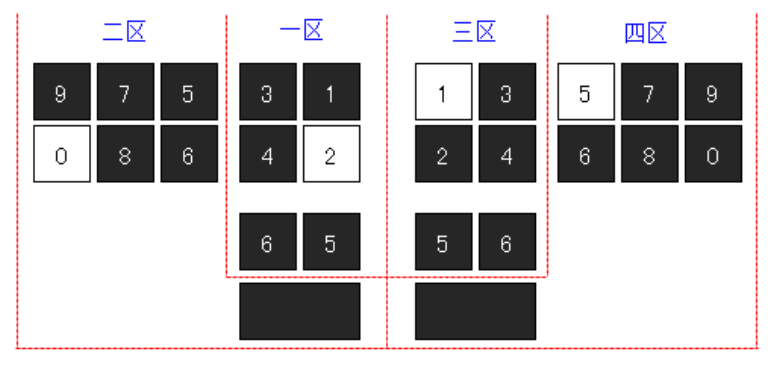
注意四个区的先后顺序,先左后右,先内后外,双手对称。
当然,这并非要求每击都必须录入四位数字,我们只是确保完全可以做到这一点。如果觉得一击录入四位数字太难,大可减少为一击只录入两位,左右手各负责一位数字,而且都只用单键。这样既简单又快速,还不容易被四个区的先后顺序搞乱,估计会是专业数字录入员最喜欢的一种方式。比如上例中的 2015 这个数字,可以分两击完成:
第一击双手并击 F:G 第二击双手并击 R:A
数字态下无输入条,所录入的数字都直接输出到目标文档中。为此,数字态下无法录入文本字母,但可录入键盘字母及配套符号,不过左手功能键若是 BG,则必须变为 IBG。
Pay attention to the order of the zones: left comes before right, inner comes before outer, and the keys are symmetrical.
Of course, this doesn't mean that every stroke has to be four digits; this merely makes sure you can do so. If you find writing four digits in one stroke too difficult, you can simplify it to writing just two digits, one key per hand. This method is simple and fast, and minimizes the risk of confusion as to the order of the four zones, and we expect this will be the method of choice for most data entry specialists. For instance, 2015 from the previous example can be written in two strokes:
F:G with both hands, then R:A with both hands
In numeric mode, there is no input buffer; all digits are written directly into the document. This means textual letters cannot be entered while in numeric mode, but keyboard letters and symbols can still be written. Note that if the designator is normally BG:, it must be changed to IBG:.
| 速记编码 Steno Outline |
输出 Output |
速记编码 Steno Outline |
输出 Output |
速记编码 Steno Outline |
输出 Output |
名称 Name | |||
|---|---|---|---|---|---|---|---|---|---|
IBG:A | a | INO:A | A | IBG:dou | INO:dou | , | 逗号 comma |
||
IBG:B | b | INO:B | B | IBG:ju | INO:ju | . | 句号 full stop |
||
IBG:DRF | c | INO:DRF | C | IBG:mao | INO:mao | : | 冒号 colon |
||
IBG:D | d | INO:D | D | IBG:fen | INO:fen | ; | 分号 semicolon |
||
IBG:N | e | INO:N | E | IBG:FG | INO:FG | ? | 反问号 question mark |
||
IBG:F | f | INO:F | F | IBG:tan | INO:tan | ! | 感叹号 exclamation mark |
||
IBG:HL | g | INO:HL | G | IBG:yin | INO:yin | " | 引号 quotation mark |
||
IBG:H | h | INO:H | H | IBG:dan | INO:dan | ' | 单引号 apostrophe |
||
IBG:G | i | INO:G | I | IBG:sheng | INO:sheng | ... | 省略号 ellipsis |
||
IBG:BD | j | INO:BD | J | IBG:po | INO:po | — | 破折号 em dash |
||
IBG:RF | k | INO:RF | K | IBG:duan | INO:duan | – | 短破折 en dash |
||
IBG:L | l | INO:L | L | IBG:lian | INO:lian | - | 连字符 hyphen |
||
IBG:BF | m | INO:BF | M | IBG:xian | INO:xian | _ | 下划线 underscore |
||
IBG:DL | n | INO:DL | N | IBG:gang | INO:gang | | | 竖杠 vertical bar |
||
IBG:O | o | INO:O | O | IBG:xie | INO:xie | / | 斜杠 forward slash |
||
IBG:BR | p | INO:BR | P | IBG:fan | INO:fan | \ | 反斜杠 backslash |
||
IBG:BDH | q | INO:BDH | Q | IBG:xing | INO:xing | * | 星号 asterisk |
||
IBG:R | r | INO:R | R | IBG:jing | INO:jing | # | 井号 number sign |
||
IBG:DF | s | INO:DF | S | IBG:an | INO:an | & | 安德 ampersand |
||
IBG:DH | t | INO:DH | T | IBG:ai | INO:ai | @ | 艾特 at |
||
IBG:U | u | INO:U | U | IBG:bo | INO:bo | ~ | 波浪号 tilde |
||
IBG:BHL | v | INO:BHL | V | IBG:tuo | INO:tuo | ^ | 脱字符 caret |
||
IBG:BH | w | INO:BH | W | IBG:dian | INO:dian | . | 点 dot |
||
IBG:BDL | x | INO:BDL | X | IBG:IH | INO:IH | · | 间隔号 middle dot |
||
IBG:BL | y | INO:BL | Y | IBG:IB | INO:IB | ( | 左括号 left parenthesis |
||
IBG:DR | z | INO:DR | Z | IBG:ID | INO:ID | ) | 右括号 right parenthesis |
||
第十八章介绍的模拟功能在数字态下也大都可用,但部分编码的左手按键有所变化。
常用功能的左手部分有所变化,若左手功能键原来是 F 则现在须变成 IF,若原来左手无按键则现在仍然保持空着。具体如下表所示:
注:浅绿底色的表示可以连续发射。
Most of the emulated operations introduced in Chapter 18 are still available in numeric mode, but some left-hand designators have changed.
The left-hand designators for these commonly used commands have changed. If the designator was originally F:, it is now IF:, but if there was no designator on the left hand that continues to be the case:
Note: The outlines in green support continuous send.
| 功能 Operation |
完整编码 Full Outline |
标准键盘对应操作 Standard Keyboard |
快捷键 Shortcuts |
|
|---|---|---|---|---|
| 回车 carriage return |
IF:hui |
Enter | IF:I |
:I |
| 空格 space |
IF:kong |
Space | IF:UO |
:UO |
| 前删 delete before |
IF:qian |
Backspace | IF:HA |
:HA |
| 后删 delete after |
IF:hou |
Delete | IF:LU |
:LU |
| 上移 move up |
IF:shang |
↑ | IF:A |
|
| 下移 move down |
IF:xia |
↓ | IF:U |
|
| 左移 move left |
IF:zuo |
← | IF:L |
|
| 右移 move right |
IF:you |
→ | IF:O |
|
| 退回上页 move up one page |
IF:tui |
Page Up | IF:V |
|
| 进入下页 move down one page |
IF:jin |
Page Down | IF:G |
|
| 行首 go to beginning |
IF:shou |
Home | IF:H |
|
| 行尾 go to end |
IF:wei |
End | IF:N |
|
| 取消 escape |
IF:xiao |
Esc | IF:D |
|
| 印屏 print screen |
IF:ping |
Print Screen | IF:RF |
|
| 制表 tab |
IF:biao |
Tab | IF:B |
|
| 插入 insert |
IF:ru |
Insert | IF:HL |
|
| 菜单 menu |
IF:dan |
Menu | IF:BD |
|
| 全空 full-width space |
:kong |
全角空格 full-width space |
||
| 换空 new line |
:BD |
换行并空两格 start a new line and indent two spaces |
||
数字状态下的鼠标模拟功能完全可用,且与中文状态下的操作完全一致,功能键无需改变,如下图所示:
Mouse emulation is fully available in numeric mode, with no changes to functionality or to the outlines used:
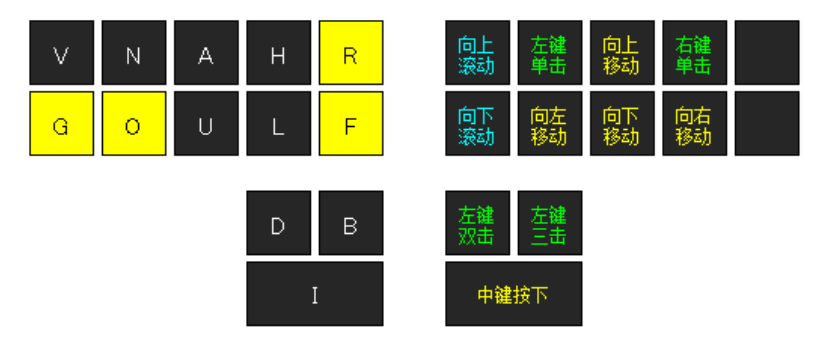
数字态下的 Alt、Ctrl、Shift、Win 与中文状态下的操作完全一致,功能键无需改变,如下表所示:
In numeric mode, Alt, Ctrl, Shift, and Win work the same way, with no modifications to outlines:
| 与功能组合 with commands |
与字母组合 with letters |
与数字组合 with numbers |
|
|---|---|---|---|
| Alt | AUB: |
NOB: |
AUOB: |
| Ctrl | AUD: |
NOD: |
AUOD: |
| Shift | AUI: |
NOI: |
AUOI: |
| Alt+Ctrl | AUBD: |
NOBD: |
AUOBD: |
| Alt+Shift | AUIB: |
NOIB: |
AUOIB: |
| Ctrl+Shift | AUID: |
NOID: |
AUOID: |
| Alt+Ctrl+Shift | AUIBD: |
NOIBD: |
AUOIBD: |
| Win | AUL: |
INOL: |
AUOL: |
F 功能的左手功能键则需要加 I 键,右手部分不变,如下表所示:
The function keys, however, have an additional I in the left-hand designator, while the right hand remains unchanged:
| 左手 Left hand |
右手(双数字) Right hand (double digit) | ||||||
|---|---|---|---|---|---|---|---|
IFG |
1 | 2 | 3 | ... | 10 | 11 | 12 |
| F1 | F2 | F3 | ... | F10 | F11 | F12 | |
在数字态下,分组符号、增补符号均无法使用,其他符号虽可使用,但操作方式和表现形式均有所变化。
首先,顶屏符号降格为一般符号,且只能用完全编码,没有快捷键;其次,所有符号无论全半角都只保留一个。具体如下表所示:
In numeric mode, grouping and supplementary symbols are not available. Other symbols are, but the way they are written changes.
Primary punctuation has been reclassified as general symbols and no longer have dedicated shortcuts. Also, all symbols, full- or half-width, only have a single variant left:
| 名称 Name |
符号 Symbol |
编码 Outline |
宽度 Width |
名称 Name |
符号 Symbol |
编码 Outline |
宽度 Width |
|
|---|---|---|---|---|---|---|---|---|
| 逗号 comma | , | :dou | 半角 half |
竖杠 vertical bar | | | :gang | 半角 half |
|
| 句号 full stop | . | :ju | 半角 half |
反斜杠 backslash | \ | :fan | 半角 half |
|
| 冒号 colon | : | :mao | 半角 half |
斜杠 forward slash | / | :xie | 半角 half |
|
| 分号 semicolon | ; | :fen | 半角 half |
引号 quotation mark | " | :yin | 半角 half |
|
| 反问号 question mark | ? | :wen | 半角 half |
单引号 apostrophe | ' | :dan | 半角 half |
|
| 感叹号 exclamation mark | ! | :tan | 半角 half |
脱字符 caret | ^ | :tuo | 半角 half |
|
| 顿号 enumeration comma | 、 | :dun | 全角 full |
小于号 less than | < | :xiao | 半角 half |
|
| 省略号 ellipsis | …… | :sheng | 全角 full |
大于号 greater than | > | :da | 半角 half |
|
| 破折号 dash | —— | :po | 全角 full |
连字符 hyphen | - | :lian | 半角 half |
|
| 点 dot | . | :dian | 半角 half |
下划线 underscore | _ | :xian | 半角 half |
|
| 星号 asterisk | * | :xing | 半角 half |
间隔号 middle dot | • | :ge | 半角 half |
|
| 井号 number sign | # | :jing | 半角 half |
· | :IH | 全角 full |
||
| 安德 ampersand | & | :an | 半角 half |
平方米 square metre | ㎡ | :ping | 全角 full |
|
| 艾特 at | @ | :ai | 半角 half |
立方米 cubic metre | m³ | :fang | 全角 full |
|
| 百分号 per cent | % | :bai | 半角 half |
短破折 en dash | – | :duan | 全角 full |
|
| 美元符 dollar sign | $ | :mei | 半角 half |
约等于 approximately | ≈ | :yue | 全角 full |
|
| 等于号 equals | = | :deng | 半角 half |
千分号 per mille | ‰ | :qian | 全角 full |
|
| 正号 positive | + | :zheng | 半角 half |
人民币 Renminbi sign | ¥ | :ren | 全角 full |
|
| 负号 negative | - | :fu | 半角 half |
对号 check mark | √ | :dui | 全角 full |
|
| 加号 plus | + | :jia | 全角 full |
错号 incorrect | × | :cuo | 全角 full |
|
| 减号 minus | - | :jian | 全角 full |
叉号 cross | :cha | 全角 full |
||
| 乘号 multiply | × | :cheng | 全角 full |
比 ratio | ∶ | :bi | 全角 full |
|
| 除号 divide | ÷ | :chu | 全角 full |
角度 degrees | ° | :du | 全角 full |
|
| 波浪 tilde | ~ | :bo | 全角 full |
摄氏度 degrees Celsius | ℃ | :she | 全角 full |
|
|
注意:反问号的编码发生了变化 Note: question mark outline has changed |
华氏度 degrees Fahrenheit | ℉ | :hua | 全角 full |
||||
配对符号无法再成对录入,只能分开录入,且左手编码须在原基础上增加 I 键,由 NL 改变为 INL,具体如下表所示:
Paired punctuation can no longer be entered as a pair; they must now be written separately. The left-hand designator has an additional I, that is, INL: instead of NL::
| 名称 Name |
符号 Symbols |
左边编码 Left Outline |
右边编码 Right Outline |
名称 Name |
符号 Symbols |
左边编码 Left Outline |
右边编码 Right Outline |
|
|---|---|---|---|---|---|---|---|---|
| 括号 full-width parentheses | ( ) | INL:IB | INL:ID |
实心方头括号 black lenticular brackets | 【 】 | INL:IRF | INL:INL |
|
| 双引号 double quotes | “ ” | INL:F | INL:L |
空心方头括号 white lenticular brackets | 〖 〗 | INL:BRF | INL:DHL |
|
| 单引号 single quotes | ‘ ’ | INL:IF | INL:IL |
小(圆)括号 half-width parentheses | ( ) | INL:BR | INL:BH |
|
| 双书名号 double title marks | 《 》 | INL:R | INL:H |
中(方)括号 square brackets | [ ] | INL:BF | INL:BL |
|
| 单书名号 single title marks | 〈 〉 | INL:IR | INL:IH |
大(花)括号 curly brackets | { } | INL:DF | INL:DL |
|
| 六角括号 tortoise shell brackets | 〔 〕 | INL:RF | INL:HL |
尖(角)括号 angle brackets | < > | INL:DR | INL:DH |
与特定码、声调码、两笔码同理,英文码也是一个与音节码平行的概念,若左右并击,能够一击录入 2 位字母,还能实现与音节码的左右交叉录入或前后混合录入,无需切换。其编码及用法如下:
Similarly to special chords, tone chords, and two-stroke chords, English chords exist separately from syllable chords. When written with both hands, they allow for writing two letters in one stroke, as well as seamless alternating writing or sequential writing in conjunction with syllable chords, not requiring you to switch modes.
| 字母 Letter |
编码 Outline |
字母 Letter |
编码 Outline |
字母 Letter |
编码 Outline |
字母 Letter |
编码 Outline |
|
|---|---|---|---|---|---|---|---|---|
| a | RHA |
n | DLANO |
A | IRHA |
N | DLANOI |
|
| b | BANO |
o | RHO |
B | BANOI |
O | IRHO |
|
| c | DRFANO |
p | BRANO |
C | DRFANOI |
P | BRANOI |
|
| d | DANO |
q | BDHANO |
D | DANOI |
Q | BDHANOI |
|
| e | RHN |
r | RANO |
E | IRHN |
R | RANOI |
|
| f | FANO |
s | DFANO |
F | FANOI |
S | DFANOI |
|
| g | HLANO |
t | DHANO |
G | HLANOI |
T | DHANOI |
|
| h | HANO |
u | RHU |
H | HANOI |
U | IRHU |
|
| i | RHG |
v | BHLANO |
I | IRHG |
V | BHLANOI |
|
| j | BDANO |
w | BHANO |
J | BDANOI |
W | RHANOI |
|
| k | RFANO |
x | BDLANO |
K | RFANOI |
X | BDLANOI |
|
| l | LANO |
y | BLANO |
L | LANOI |
Y | FLANOI |
|
| m | BFANO |
z | DRANO |
M | BFANOI |
Z | DRANOI |
说明:
RH 构成。ANO 构成。I 键。应用示例:
Notes:
RH to their regular letter chords.ANO to their regular letter chords.I to the corresponding lowercase letters.Usage examples:
DHANO:HANO |
th |
GRH:DFANO |
is |
chi:DLANO |
chin |
NRH:se |
ese |
eng:LANO |
engl |
an:DANO |
and |