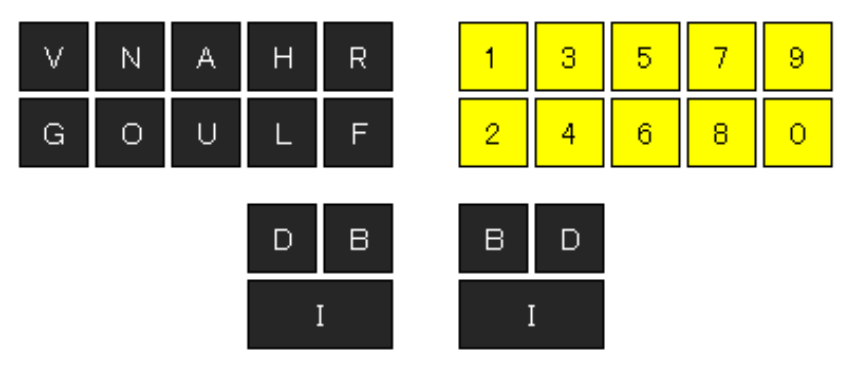
第五章 单字与词语
学完基础编码后,就可以真正地进行文字录入了,但在这之前,最好先熟悉一下基本的字词录入规则。
第一节 单字打法
单字录入有常规打法和消词定字两种方式。
一、常规打法
常规打法即单独使用左手(或者右手)直接输入单字的音节码,然后用单键数字、辅助码、声调码或两笔码筛选想要的单字。数字选重详见第六章第二节,辅码选重详见第七章、声调码、两笔码选重详见第十二章。
推荐使用左手来录入单字,因为右手按键单独使用时设置了一系列功能键,若有冲突,功能键
会优先于音节码而将其掩盖掉。
候选项默认只有 4 条,如果候选项数量多于该设定值,则需要分页显示,如果想要的字词不在当前页,则需要翻页显示,翻页功能键为:
5 Single Characters and Phrases
Once you have mastered the basics, you are ready to begin actual text entry, but before doing so, you should first familiarize yourself with the fundamental rules for entering characters and words.
5–1 Single Character Entry
There are two methods for entering single characters, the standard method and the remove-and-select method.
1. Standard Method
The standard method involves using the left or right hand exclusively to directly write the syllable chord for a single character, then using the number keys, auxiliary chords, tone chords, or two-stroke chords to select the specific character you want. For more information on using numbers to resolve ambiguity, refer to Chapter 6, Section 2; for auxiliary chords, see Chapter 7; and for tone chords and two-stroke chords, see Chapter 12.
Using the left hand for entering characters is recommended, because the keys on the right hand have been assigned a series of function keys for use when pressed independently. If there are any conflicts, the function keys take precedence.
The candidate list only displays four entries. If the number of potential candidates is higher, they are displayed across multiple pages. If the entired character is not on the current page, you must navigate to the next page with the following keys:
前翻页
previous page |
:BN |
后翻页
next page |
:DN |
二、消词定字
受重码率影响,许多字词按常规方法录入非常不便,因为它们不是首选项,需要进一步选择,有的甚至翻页才能找到,严重降低了录入速度。但若使用消词定字方式,则往往会起到事半功倍的效果。
譬如:想录入“师”,可先录入“老师”,然后把“老”删掉;想录入“迅”,可先录入“迅速”,然后把“速”删掉。这就是消词定字,删除词语的前字叫消前定后,删除词语的后字叫做消后定前,其功能键如下:
2. Remove-and-Select Method
Due to the amount of homophones and duplicate entries, writing many characters and words using the standard method can be quite cumbersome. Words often do not appear as the first option in the and require further manual selection, including scrolling through multiple pages to find them, which can be very slow. However, by using the remove-and-select method, you can write more efficiently with less effort.
For example, to write the character 师, you can first write the word 老师 and then remove the character 老. Similarly, to write 迅, you can first write the word 迅速 then remove the character 速. Deleting the first character of a word is called "deleting the first and selecting the last"; deleting the last character is called "deleting the last and selecting the first". The corresponding chords are:
消前定后
remove first,
select last |
IF: |
消后定前
remove last,
select first |
:IF |
刚开始使用这个功能时,可能一下子反应不过来该消哪个字、留那个字,其实很简单,只要记住“左手消左字,右手消右字”即可。
When you first start using this feature you might hesitate as to which character to delete and which to keep; just remember that the left hand deletes the left character, and the right hand deletes the right character.
LA O :IB L (老师)
I F : 师
BD L G : D F U (迅速)
:I F 迅
消词定字功能仅对二字词有效,对单字无效。
但要注意一点,消词定字功能最好只用于首选词。因为当所需词语并非首选项时,必须先通过选择、加辅助码筛选等方式让其成为首选项。若在这种情况下使用消词定字功能,无疑违背了设计该功能的初衷。
单字还可以通过直击字、首尾码、笔画码等方式录入,具体内容请参考后续相关章节。
The remove-and-select method is only effective for two-character words and does not apply to single characters.
However, it's also important to note that this works best when the desired word appears as the primary candidate. If the desired word is not the primary candidate, you must first use other methods, such as direct input or auxiliary chords, to lift it to that position. Using the delete-and-select method in those situations goes against its original design goal.
Single characters can also be entered with other methods, such as direct input, head-and-tail chords, or stroke-based chords; more information on these is in later chapters.
三、打法查询
对于输入条缓冲行上的最后一个字,大家可以用功能键 F:cha 查询其唯一化打法。比如:录入“速记”后按下 F:cha,则输入条候选区会显示“记”的直击打法、部首辅助码、首尾码等各种唯一化打法,如下图所示:
          速记
          直击: 4:ji
          部首: yan (讠)
          首尾: yan:ji (讠:己)
3. Input Method Lookup
For the final character located on the input line, you can use the function stroke F:cha to look up its unique outline. For example, after writing 速记 and pressing F:cha, the candidate area will display various ways to uniquely write the character 记, including its direct input outline, component-based auxiliary chord, head-and-tail chord, and more:
          速记
          直击: 4:ji
          部首: yan (讠)
          首尾: yan:ji (讠:己)
第二节 全码打法
所谓全码打法,就是连续录入词语的全部音节码。需要注意的是,速录机以“击”为单位,无论单音节还是双音节,都能够在一击之内完成。因此,对于三字以上词语,最好根据语意自然切分成单双音节,然后再按照正常逻辑来录入,即单音节用单手录入,双音节用双手录入。比如:
- 录入“大数据”需要两击:
第一击:左手录入“大”的音节码;
第二击:双手录入“数据”的音节码。
- 录入“人工智能”需要两击:
第一击:双手录入“人工”的音节码;
第二击:双手录入“智能”的音节码。
- 录入“盘古开天地”需要三击:
第一击:双手录入“盘古”的音节码;
第二击:左手录入“开”的音节码;
第三击:双手录入“天地”的音节码。
- 录入“过五关斩六将”需要四击:
第一击:左手录入“过”的音节码;
第二击:双手录入“五关”的音节码;
第三击:左手录入“斩”的音节码;
第四击:双手录入“六将”的音节码。
5–2 Full Phrase Entry
The full phrase method involves entering the phonetic chords for each word in the phrase. It is important to note that the steno machine operates on units of strokes, so whether each word is one syllable or two, it can be written in a single stroke. For phrases consisting of three or more characters, it's best to naturally split them into single and double syllables semantically, and then enter them according to the conventional rules, single syllables being entered with one hand and double syllables entered with both. For example:
- 大数据 requires two strokes:
write 大 with the left hand (da:),
then 数据 with both hands (shu:ju).
- 人工智能 requires two strokes:
write 人工 with the left hand (ren:gong),
then 智能 with both hands (zhi:neng).
- 盘古开天地 requires three strokes:
write 盘古 with both hands (pan:gu),
then 开 with the left hand (kai:),
then 天地 with both hands (tian:di).
- 过五关斩六将 requires four strokes:
write 过 with the left hand (guo:),
then 五关 with both hands (wu:guan),
then 斩 with the left hand (zhan:),
then 六将 with both hands (liu:jiang).
D A :
B L U : BD U 大数据
R N :I HL O
B F L : D L N G 人工智能
B R A N : HL U
I RF A :
D HLA N : D HL 盘古开天地
HL O :
U : HLA OG
B H A N :
I L U O : BD A N G 过五关斩六将
睡惯了席梦思就不愿再睡大板床。体验了双音节录入的快感之后,很多人就不愿再按照语意的自然切分来录入单音节。比如:
- 录入“未成年人”这样的词语,按照语意的自然切分,正常打法应该是:
第一击:左手录入“未”的音节码;
第二击:双手录入“成年”的音节码;
第三击:左手录入“人”的音节码。
但很多人更倾向于下面的两击打法:
- 第一击:左手录入“未”的音节码,同时右手录入“成”的音节码;
第二击:左手录入“年”的音节码,同时右手录入“人”的音节码。
输入法虽然允许这样录入,但我们并不提倡这么做,毕竟它棒打鸳鸯强扭瓜,该分的不分,该连的不连,破坏了语言结构。不过话又说回来,这种打法虽然不好,有时却能避免一些潜在的捆绑错误。
比如,本想录入“未成年人天堂”这 6 个字,那么:
当录入“未成年人”时使用了规范的三击打法,最终结果却是错误的,如下所示:
          未成年任天堂

          >任天堂 天堂 甜汤 天塘
而当录入“未成年人”时使用了不规范的两击打法,最终结果却是正常的,如下所示:
          未成年人天堂

          >天堂 甜汤 天塘
这种情况不免令人尴尬,就好像做了错事得奖励,而没做错的反倒受惩罚。如此毁三观的事情我们当然是不能接受的,更不能任其肆意发展。我们必须拨乱反正,做一个能够将语意的自然切分与词语的正确捆绑都兼顾到的打法,以此来弥补算法的不足。我们所说的正是下面的平衡打法。
After experiencing disyllabic input, many people stop wanting to enter syllables according to the way the language naturally segments words. For example:
- When entering a phrase like 未成年人, the standard way of writing this according to units of meaning would require three strokes:
未 with the left hand (wei:),
then 成年 with both hands (cheng:nian),
then 人 with the left hand (ren:).
- However, many users seem to prefer the following:
未成 with both hands (wei:cheng),
then 年人 with both hands (nian:ren).
Although this is technically allowed by the input method, we do not recommend it. It unnaturally joins characters that should be separate and separates ones that should be joined, disrupting the natural linguistic structure. That said, while this method is generally ill-advised, it can occasionally help avoid certain issues related to word segmentation.
For example, to enter the six-syllable phrase 未成年人天堂:
When writing 未成年人 with the three-stroke approach mentioned above, the final result turned out incorrect:
          未成年任天堂

          >任天堂 天堂 甜汤 天塘
But when writing it with the nonstandard two-stroke approach, the result turned out correct:
          未成年人天堂

          >天堂 甜汤 天塘
This situation is quite awkward; those who do wrong are rewarded, and those who do no wrong are punished. We think this is unacceptable and cannot allow this to continue. We must make things right by adopting an approach that balances the natural segmentation of the language and the correct grouping of words, compensating for the shortcomings of this approach. This is the balanced entry method, shown below.
第三节 平衡打法
为了保持击键的左右平衡,我们特别设置了两个功能键,当录入单音节时需要同步按下相应的平衡功能键。
5–3 Balanced Entry
To maintain left-right balance, we have assigned two function chords; when entering single syllables, the corresponding chord must also be pressed.
:AU |
对于词首、词中的单字,在左手录入该字音节码的同时,右手要按此功能键
For characters at the beginning or in the middle of a phrase,
in addition to the phonetic chord on the left hand
|
:BR |
对于词尾的单字,在左手录入该字音节码的同时,右手要按此功能键
For characters at the end of a phrase,
in addition to the phonetic chord on the left hand
|
仍以“未成年人天堂”为例,当录入“未成年人”时使用规范的三击平衡打法:
第一击:左手录入“未”的音节码,同时右手按 AU 键;
第二击:双手录入“成年”的音节码;
第三击:左手录入“人”的音节码,同时右手按 BR 键。
然后再录入后续的“天堂”二字,那么结果就一定是正确的。
Using the example of 未成年人天堂, the balanced approach for writing 未成年人 also requires three strokes:
未 on the left hand, and AU on the right hand (wei:AU),
then 成年 on both hands (cheng:nian),
then 人 on the left hand and BR on the right hand (ren:BR).
Then proceed to enter 天堂, and the result will be correct.
U OG : AU
B HL N G :I D LA N
R N : B R 未成年人
Below are more examples of balanced entry.
BD H U :I RF U 区块
BD LA N : B R 链
I G : AU 云
BD : D F A OG 计算
BD H : AU 去
B F L O : BD L N 中心
I H G : B R 化
I G : AU 云
F U : U 服务
BD H : B R 器
H U :I LA N 互联
I F N : AU 网
I D F : U OG 思维
B F O : D A O 磨刀
B U : U 不误
RF A N :IB HLA 砍柴
I HL O : B R 工
DR O : AU 做
I : D HLA N 一天
H : B LA N G 和尚
B F L N : AU 撞
I : D HLA N 一天
B F L O : B R 钟
除了起到平衡作用,这两个平衡键更重要的功能是增加了录入信息。AU 使当前录入的单字与前面已经录入的内容和后续即将录入的内容进行双向互联,以实现长词的连贯;BR 使当前录入的单字与前面的内容进行前向互联,并截断与后续内容的潜在捆绑,以确定词语的边界,起到了分词作用。既然提到分词,也许下面的分词打法才是最高效的。
Beyond balancing keystrokes, these two keys have a more significant role in providing contextual information. The :AU chord establishes a link between the character and the words on either side of it, ensuring coherent phrases, whereas the :BR chord only creates a link between the character and the preceding word, marking the end of a phrase, which is effectively word segmentation. Speaking of which, the approach described below may well be the most efficient.
第六章 符号与编辑
除字词之外,标点、数字、字母也是组成文章不可或缺的关键要素;此外,诸如空格、回车、删除、移动等功能也是语句录入过程中必不可少的重要成分。如何用速录机输入这些符号或功能,就是本章要学习的内容。
第一节 标点符号
根据形状、特点和使用频率的不同,我们将标点符号分为顶屏符号、配对符号、一般符号、分组符号、增补符号五大类。本节先介绍最常用的一部分标点符号,其余符号请看第十七章。
一、顶屏符号
顶屏符号共有 9 个(黄底色的破折号并非半角,它是英文中的 m-dash) :
6 Special Characters and Editing
Aside from words, symbols, numerals, and letters are key elements of writing text. Functions such as inserting spaces, deleting, and moving are also essential to the process. This chapter covers how to write these symbols and perform these commands on a steno machine.
6–1 Symbols
Based on their form, characteristics, and frequency of use, symbols can be classified into five major categories: primary punctuation, paired punctuation, general symbols, grouping symbols, and supplementary symbols. This section introduces the most commonly used symbols; for the remainder, refer to Chapter 17.
1. Primary Punctuation
There are 9 primary punctuation marks (note that the one in yellow is not a half-width character, but an English em dash):
名称
Name |
全角
Full-width |
半角
Half-width |
编码
Phonetic |
快捷键
Brief |
逗号
comma |
, | , |
:dou |
:B |
句号
full stop |
。 | . |
:ju |
:D |
顿号
enumeration comma |
、 | |
:dun |
|
冒号
colon |
: | : |
:mao |
|
分号
semicolon |
; | ; |
:fen |
|
反问号
question mark |
? | ? |
|
:FG |
感叹号
exclamation mark |
! | ! |
:tan |
|
省略号
ellipsis |
…… | … |
:sheng |
|
破折号
dash |
—— | — |
:po |
|
顶屏符号的特点如下:
- 单独用右手录入,大都取其名称特征字的音节编码,操作方便,记忆简单。
- 录入后会即刻输出到目标文档中,若输入条缓冲行有内容则将其一并顶上屏。
- 若录入符号的同时左手按
LN,则可临时切换全半角。
Primary punctuation has the following characteristics:
- They are entered exclusively using the right hand, typically with the syllable chords of key characters in their names, to ensure convenient entry.
- Upon entry, the symbol is immediately output to the document, and if the input line contains any content, that is also output alongside the symbol.
- If
LN: is pressed on the left hand while writing a symbol, the full-width/half-width character mode is toggled.
二、配对符号
配对符号共计 20 对,下面先介绍较常用的 5 对。
2. Paired Punctuation
There are 20 sets of paired punctuation. The most common 5 pairs are shown below.
名称
Name |
配对符号
Punctuation |
成对录入编码
Paired Outline |
分开录入编码
Separate Outlines |
双引号
double quotation marks |
“ ” |
LN:yin |
LN:F |
LN:L |
单引号
single quotation marks |
‘ ’ |
LN:dan |
LN:IF |
LN:IL |
双书名号
double title marks |
《 》 |
LN:shu |
LN:R |
LN:H |
单书名号
single title marks |
〈 〉 |
LN:ming |
LN:IR |
LN:IH |
圆括号
parentheses |
( ) |
LN:yuan |
LN:IB |
LN:ID |
配对符号的特点如下:
需双手同时操作,无论成对录入还是分开录入,左手编码统一为 LN
分开录入时,右手均由拇指或食指操作,且左右成双。
分开录入时,符号会顶屏,但要注意符号的左右顺序。
成对录入时,右手为其名称特征字的音节码,便于记忆。
Paired punctuation has the following characteristics:
- Writing them requires both hands, whether entering in pairs or separately, and the left hand is always
LN:.
- When writing symbols separately, the right hand only needs one finger, maintaining symmetry between both sides.
- When entered separately, the symbol appears directly in the document, but you must make sure to enter them in order.
- When entered in pairs, the right hand is the phonetic chord of a distinctive character in the name of the symbol, making it easier to memorize.
三、一般符号
一般符号共计 40 个,下面先介绍较常用的 14 个。
3. General Symbols
There are 40 general symbols, the 14 most common of which are shown below.
名称
Name |
半角
Half-width |
全角
Full-width |
编码
Outline |
名称
Name |
半角
Half-width |
全角
Full-width |
编码
Outline |
加号
plus | + | + | :jia |
大于号
greater than | > | > | :da |
减号
minus | - | - | :jian |
小于号
less than | < | < | :xiao |
乘号
multiply | * | × | :cheng |
百分号
per cent | % | % | :bai |
除号
divide | / | ÷ | :chu |
千分号
per mille | | ‰ | :qian |
等号
equals | = | = | :deng |
平方米
square metre | | ㎡ | :ping |
点
decimal point | . | . | :dian |
间隔号
middle dot | • | | :ge |
比
ratio | | ∶ | :bi |
· | :H |
一般符号的特点如下:
- 单独用右手录入,且大都取其名称特征字的音节码,操作方便,记忆简单。
- 若只有全角或半角则会顶屏。
- 若全半角都有,则首选项均为半角,次选项均为全角。
General symbols have the following characteristics:
- All outlines use only the right hand, and most are derived from the phonetic chords for distinctive characters in the name of the symbol, for easier memorization.
- If the symbol has only a full-width option or only a half-width option, that character is automatically output.
- If both full-width and half-width options are available, the first candidate is the half-width version, and the second candidate is the full-width version.
第三节 编辑功能
文字录入过程中常用的编辑功能主要有以下三类:
一、回空删移
6–3 Editing Commands
Editing commands commonly used during text input primarily fall into three types:
1. Spacing and Deletion
功能
Command |
标准键盘对应操作
Standard Keyboard |
快捷键
Outlines |
回车
carriage return |
Enter |
F:I |
:I |
空格
space |
Space |
F:UO |
:UO |
前删
delete previous |
Backspace |
F:HA |
:HA |
后删
delete next |
Delete |
F:LU |
:LU |
上移
move up |
↑ |
F:A |
|
下移
move down |
↓ |
F:U |
|
左移
move left |
← |
F:L |
|
右移
move right |
→ |
F:O |
|
- 最常用的回车、空格、前删、后删安排了两组快捷键,第 2 组快捷键均为第 1 组的右手部分,操作更便捷。
- 除了回车的第二个快捷键(右手
I 键),其余功能键均可连续发射。所谓连续发射,就是指某功能键如果一直按住不动,则相应功能会持续发生作用,直至双手抬起或者尽头已至(空格和回车没有尽头)。
譬如:若一直按住 F:A,则光标会一直向上移动,除非双手抬起或者已到顶端才会停下来。
- For the most frequently used keys (Enter, Space, Backspace, Delete), two outlines have been assigned. The second outline is simply the right-hand side of the first one, for more convenient operation.
- Except for the second outline for Enter (
:I), all other command outlines support continuous send. This means if a specific outline is held down continuously, the corresponding command will be sent repeatedly until the hands are lifted or a limit is reached (Space and Enter have no such limits).
For example, holding down F:A continues to move the cursor up until your hands are lifted or the cursor reaches the beginning of the document.
二、文本选中
我们知道,点击鼠标左键并拖动可以选中文本。在标准键盘上,这一功能也可以用 Shift 加上下左右箭头的组合来实现。而在速录机上,我们则可以通过对标准键盘进行模拟来实现选中文本的功能。
在本速记方案中,Shift 功能由左手 AUI 模拟,选中文本的功能如下所示:
2. Text Selection
We know that text can be selected by clicking and dragging the left mouse button. On a standard keyboard, you can also do this by combining the Shift key with the arrow keys. On a steno machine, we can perform these operations by emulating the layout of a standard keyboard.
In this steno system, the Shift key is emulated with AUI: on the left hand:
速记编码
Steno Outline |
功能
Command |
标准键盘
Standard Keyboard |
AUI:A |
向上选中文本
select upwards |
Shift + ↑ |
AUI:U |
向下选中文本
select downwards |
Shift + ↓ |
AUI:L |
向左选中文本
select to the left |
Shift + ← |
AUI:O |
向右选中文本
select to the right |
Shift + → |
注意,上述功能的右手编码与移动功能的右手编码完全一致。
Note that the right-hand side of the outlines above is identical to the right-hand side of the corresponding movement outlines.
三、剪拷粘存
标准键盘上的剪切、拷贝(复制) 、粘贴、保存等功能,同样可以用速录机进行模拟。在本速记方案中,Ctrl 功能由左手 NOD 模拟,上述四个功能如下所示:
3. Cut, Copy, Paste, Save
Functions such as Cut, Copy, Paste, and Save, typically found on a standard keyboard, can also be emulated on a steno machine. In this system, the Ctrl key is emulated with NOD:
速记编码
Steno Outline |
功能
Command |
标准键盘
Standard Keyboard |
NOD:BDL |
剪切
cut |
Ctrl + X |
NOD:DRF |
拷贝
copy |
Ctrl + C |
NOD:BHL |
粘贴
paste |
Ctrl + V |
NOD:DF |
保存
save |
Ctrl + S |
注意,上述功能的右手编码与相应字母的右手编码完全一致,且粘贴功能另有兼容码 NOD:V。
Note that the right-hand side of the outlines above is identical to the right-hand side of the corresponding letters. In addition, Paste also has a second outline NOD:V.
第七章 辅码与选重
汉语拼音音节只有 400 多个,而汉字却有数万个,这导致一个必然的结果,就是汉字中存在着大量同音字。字有穷,词无限,同样的道理,汉语中必然也存在大量同音词。如果像普通输入法那样,仅通过拼音来录入汉字,并频繁使用候选翻页和数字键选功能,势必会浪费掉许多宝贵时间,严重减缓录入速度。
为解决这个问题,E 迅速记专门设计了更加便捷的辅助码(简称“辅码”) ,通过在拼音基础上加入以读音表示的偏旁部首信息来迅速缩小选择范围,达到快速命中之目的。因为尽管同音字词很多,但字词本身读音和其部首读音都相同的就很少了。
实践证明,辅码极其高效,也极尽简单,是非常成功的一项实用技巧。它使得用户避免了强行记忆大量字词的排序,或者将词语拆分成单字进行录入的窘境,在不增加更多击键次数的情况下,实现了很高的字词唯一化程度,解决了速记技能提速瓶颈的一个关键问题。
7 Auxiliary Chords and Disambiguation
There are only over 400 distinct syllables in the Hanyu Pinyin system, but Chinese characters number in the tens of thousands. The inevitable result of this is that a large number of characters are homophones. In the same way that there are a finite number of characters but a practically infinite number of words, it follows that the Chinese language also has a lot of homophonous words. If we were to rely solely on Pinyin input, as is the case with many conventional input methods, and frequently navigate candidate lists to select the right words, precious time would be wasted and typing speed would be severely impacted.
To address this issue, EXun has developed a more convenient system of auxiliary chords, which include information about character components in addition to the standard Pinyin input to quickly narrow down the potential candidate characters, enabling users to more quickly enter the desired character or word. This works because while there are many homophones, it's quite rare for a character or word and its components to share the same pronunciation.
Our experience has shown that auxiliary chords are both very convenient and simple, which makes this approach very successful and practical. This system takes away the burden of memorizing the order of numerous characters and words, as well as the awkward situation of breaking down phrases into individual characters. By achieving a high degree of disambiguation without increasing the total number of keystrokes, it resolves a crucial bottleneck for increasing writing speed.
第一节 编码方案
辅助码创设之初只有部首码一种,后来不断拓展,又先后引入了首尾码和两笔形码。三种编码可同时使用,且默认均已开启。
部首码是按照国家教育部、国家语委在 2009 年2 月 25 日发布的《GB13000.1 字符集汉字部首归部规范》为基础设计的,该标准已于 2009 年 5 月 1 日起正式实施,它对一些部首有争议或多部首的单字做了规定,具体某个字应该归于哪个部首,也都作了明示。部首码(详见附表 1)包括 201 组共 282 个偏旁部首,大多都以直接发音作为编码,比如部首“八”的编码就是 ba,部首“土”的编码就是 tu,只有少数需要特别记忆。
而首尾码,就是某个字明显可见的首部件(首码)和尾部件(尾码) 。首尾码基本上涵盖了部首码,因为绝大多数部首不是字的首部件,就是字的尾部件。所以,在应用辅码选重时,不必过多纠结到底使用了部首码还是首尾码,因为二者是有重叠的,很难不假思索就完全分得清楚。两笔形码则是由标准键盘超强两笔方案改造移植而来,简称两笔码或二笔码。
部首码、首尾码、两笔码本质上都是形码,但编码方式有所不同。部首码和首尾码采用了“以音托形”的方式,直接重复利用既有的音节码来表示,属于音节类编码,它们作为辅码时使用方法完全一致。 两笔码则采用了“独立编码” 的方式, 额外设置了一组编码来表示,属于字形类编码,它作为辅码时使用方法更加简单高效,因为它无需功能键,而且可以一击追加两个辅码。但因其编码方案相对较难,故将其安排在中级篇第十二章介绍。本着循序渐进的原则,本章只介绍使用部首码和首尾码筛选字词的方法。
7–1 Encoding Schemes
The auxiliary chord system originally consisted only of the component chord, but it was later expanded to incorporate head-and-tail chords and two-stroke shape chords. All three methods can be used together and are enabled by default.
Component chords were designed based on the GB 13000.1 Specification for Identifying Indexing Components, issued by the Ministry of Education and the State Language Commission on February 25, 2009, which came into effect on May 1, 2009. It establishes specific guidelines to explicitly designate indexing components, or radicals, to individual characters where this may be unclear. There are 201 component chords for a total of 282 distinct radicals. Most of these are encoded based on their pronunciation, for example the 八 radical has a chord corresponding to ba, and 土 to tu, with only a handful requiring memorization.
Head-and-tail chords refer to the easily identifiable initial (head) and final (tail) components of each character. Head-and-tail chords are essentially a superset of component chords, as the vast majority of radicals serve as the initial or final component of a character. When using auxiliary chords to disambiguate, you should not overanalyze whether component chords or head-and-tail chords are being used, since it's difficult to tell them apart neatly. Two-stroke shape chords, meanwhile, are adapted from the very efficient two-stroke input system designed for standard keyboards, and we simply call them two-stroke chords.
Component chords, head-and-tail chords, and two-stroke chords are all fundamentally shape-based, but differ in their approach. Component and head-and-tail chords directly reuse existing syllable chords for representation and thus can be classified as syllabic encoding, and their usage is identical when used as auxiliary chords. Two-stroke chords, on the other hand, use shape-based encoding and use a distinct set of chords independent of those of the syllables. When used as auxiliary chords, two-stroke chords are more efficient, since they do not require function chords and allow for two auxiliary chords with one stroke. However, the encoding is fairly complex, so we introduce it in Chapter 12. For now, this chapter focuses on component and head-and-tail chords to filter and select characters and words.
第二节 单字选重
在单字录入过程中,使用辅码选重的方法、步骤和功能键如下图所示:
7–2 Single Character Disambiguation
For writing single characters, the method used for character selection with auxiliary chords is shown below:
前一击
First stroke |
第二击
Second stroke |
单字音节码
Syllable
phonetic |
辅码:通用功能键 LN
Auxiliary chord :
Function chord LN |
譬如,想录入单字“始”,由于读音为 shi 的汉字重码很多,有数十个。而“始”的字频并不高,若用翻页选择的方式来录入将非常麻烦,但若使用辅码选重,就能快速命中。
一、部首码选重
第一击:左手录入“始”的音节码;
          >是
           使 亻 ren:li 吏
           十 一 heng:shu 丨
           時 日 ri:cun 寸
第二击:左手录入部首“女”的音节码,同时右手按通用功能键 LN。
          >始
           媞 女 nv:shi 是
           姼 :duo 多
           嬕 :gao 睪
候选区就只剩四个读音为 shi、部首读音为 nü的单字,其中“始”的字频最高并排在首位。
For example, to write the single character 始, since there are many Chinese characters with the reading shi and the frequency of 始 is relatively low, writing it manually by flipping through several pages would be quite cumbersome. By using auxiliary chords to disambiguate, you can quickly select the exact character.
1. Component Chord Disambiguation
In the first stroke, write 始 phonetically with your left hand (shi:):
          >是
           使 亻 ren:li 吏
           十 一 heng:shu 丨
           時 日 ri:cun 寸
Then in the next stroke, write 女 phonetically with your left hand, together with the function chord :LN with your right hand (nü:LN).
          >始
           媞 女 nv:shi 是
           姼 :duo 多
           嬕 :gao 睪
The list of candidates now only contains four characters pronounced shi with the radical pronounced nü; 始 has the highest frequency of them and appears first.
二、首尾码选重
由于“始”的首码就是其部首“女”,上面的部首码选重已经说明如何使用,所以这里选择“始”的尾码“台”来加以说明。
第一击:左手录入“始”的音节码;
          >是
           使 亻 ren:li 吏
           十 一 heng:shu 丨
           時 日 ri:cun 寸
第二击:左手录入尾码“台”的音节码,同时右手按通用功能键 LN。
          >始
           乨 台 tai:kong 乚
           兘 元 yuan:
候选区就只剩三个读音为 shi、首码或尾码的读音为 tai 的单字,其中“始”的字频最高排在首位。
2. Head-and-Tail Chord Disambiguation
Since the initial component of 始 is already its radical 女, we will instead use the final component 台 to illustrate this example.
In the first stroke, write 始 phonetically with your left hand (shi:):
          >是
           使 亻 ren:li 吏
           十 一 heng:shu 丨
           時 日 ri:cun 寸
Then in the next stroke, write 台 phonetically with your left hand, together with :LN with your right hand (tai:LN):
          >始
           乨 台 tai:kong 乚
           兘 元 yuan:
The candidate list now only contains three characters pronounced shi that have an initial or final component pronounced tai; 始 again has the highest frequency and appears first.
三、异步与同步
为了更加灵便,用辅码对单字选重时,还可使用下面的方式:
3. Sequential and Parallel Input
For more flexibility, when selecting among homophones for a single character using auxiliary chords, you can also write as follows:
前一击
First stroke |
第二击
Second stroke |
单字音节码:辅码
Syllable phonetic
: Auxiliary chord |
:通用功能键 LN
: Function chord LN |
简单来说,这种方式就是单纯把辅码从第二击提前到了第一击,其功能键和选重机制则完全一样。若把先前的选重步骤概括为异步追加式,那么当前的选重步骤则可以理解成同步直加式,二者只是形式不同,并无本质区别,大家可根据各自的习惯和喜好灵活选用。
仍以单字“始”为例,若采用同步直加方式进行辅码选重,则方法如下:
1. 部首码选重
第一击:左手录入“始”的音节码,右手录入其部首“女”的音节码,相当于录入了一个读音为 shi’nü的两字词。
>使女 侍女 仕女 士女 实女 石女
第二击:右手按通用功能键 LN。
          >始
           媞 女 nv:shi 是
           姼 :duo 多
           嬕 :gao 睪
其结果与使用异步追加式的部首选重完全相同。
This method simply involves moving the auxiliary chord to the first stroke, and the function chord and disambiguation method remain the same. If the previous method is considered a sequential approach, then the current process can be considered a parallel approach. The two only differ in terms of shape; you are free to use whichever method you prefer.
Continuing with the 始 example, it can be written with the parallel approach as follows:
1. Component Code Disambiguation
In the first stroke, write 始 phonetically with the left hand, and 女 with the right hand (shi:nü), as if writing a two-character word shinü:
>使女 侍女 仕女 士女 实女 石女
In the second stroke, write :LN on the right hand:
          >始
           媞 女 nv:shi 是
           姼 :duo 多
           嬕 :gao 睪
The results are identical to the sequential approach.
2. 首尾码选重
第一击:左手录入“始”的音节码,右手录入其尾码“台”的音节码,相当于录入了一个读音为 shi’tai 的两字词。
>事态 失态 师太 石台 世态 势态
第二击:右手按功能键 LN。
          >始
           乨 台 tai:kong 乚
           兘 元 yuan:
其结果与使用异步追加式的尾码选重完全相同。
2. Head-and-Tail Chord Disambiguation
In the first stroke, write 始 phonetically with the left hand, and 台 with the right hand (shi:tai), as if writing a two-character word shitai:
>事态 失态 师太 石台 世态 势态
In the second stroke, write :LN on the right hand:
          >始
           乨 台 tai:kong 乚
           兘 元 yuan:
Again, the results are the same as with the sequential approach.
四、首辅与尾辅
前文提到,部首码、首尾码可以混合使用,且共享一个通用功能键 LN。这样做虽然简单方便,但却不能发挥首尾码的最大潜力。
比如:录入单字“弘”时若选其首码“弓”来选重,则不能将其一击选出,因为其他同音字也有读音为 gong 的辅码。如下图所示:
>哄 虹 洪 宏 烘 弘
仔细分析不难发现,虽然这些字都有读音为 gong 的辅码,但前 5 个字都是尾码读音为 gong,唯独“弘”是首码读音为 gong。也就是说,若能明确辅码为首码,则“弘”就能被快速命中。于是,我们专门针对首码特别设置了一个首辅功能键 IF,用它替代 LN,便可将“弘”一击选出。
>弘 翃 彋
4. Head-and-Tail Chords
As mentioned previously, component chords and head-and-tail chords can be used in combination and share the same function chord, :LN. While this approach is simple and convenient, it doesn't quite take full advantage of the power of head-and-tail chords.
For example, when writing the character 弘, if you use its initial component 弓 to disambiguate, you cannot select it with a single keystroke since many other homophones have a component pronounced gong:
>哄 虹 洪 宏 烘 弘
While all these characters have a component pronounced gong, the first five characters have it as their final component, while only 弘 has it as its initial component. This means we can instantly select 弘 if only we were able to specifically designate the auxiliary chord as an initial component. To solve this, we have assigned a dedicated initial designator chord :IF. By using this chord instead of :LN, we can select 弘 with only one keystroke:
>弘 翃 彋
再如:录入单字“炎”时若直接使用辅码“火”加功能键 LN 的方式选重,则结果会是“烟”排在首位。因为“火”同时也是“烟”的辅码,且“烟”的字频比“炎”要高。
>烟 炎 焰 焱 煙 樮
但若能明确辅码是尾码,则结果就会是“炎”排在首位,因为本例中以“火”为尾码的单字,“炎”的字频最高,排位最靠前。故此,我们也专门针对尾码特别设置了一个尾辅功能键 IH,用它替代 LN,便可将“炎”一击选出。
>炎 焱 樮 炏
Another example: when writing 炎, if you input the auxiliary chord 火 followed by :LN, the result shows 烟 in the first position, since 火 also serves as the auxiliary chord for 烟, and 烟 is more frequent than 炎.
>烟 炎 焰 焱 煙 樮
However, if you can specify that the auxiliary chord is a final component, the result will instead show 炎 at the top, because among all of the characters with 火 as the final component, 炎 is the most frequent. Therefore, we have also assigned a dedicated final designator chord :IH to handle this cases. By using :IH instead of :LN, you can select 炎 with only one keystroke:
>炎 焱 樮 炏
首辅
initial component |
:IF |
尾辅
final component |
:IH |
使用首辅、尾辅功能键来替代通用的辅码功能键,能更有效地离散重码单字,原则上我们也更提倡大家使用。但请注意,首辅和尾辅功能键只能异步追加,不能同步直加。
Using the initial and final designators to replace the generic designator for auxiliary chords can more effectively disambiguate homophones, so we strongly recommend you adopt this approach. However, note that the initial and final designators can only be used with sequential input.
第三节 词语选重
使用辅码进行词语选重的步骤、方法及功能键,与单字选重完全一致:
7–3 Phrase Disambiguation
We can use the same approach we used for selecting single characters to select phrases:
录入
Input |
筛选
Filtering |
词语
Phrase |
辅助码读音:LN
Auxiliary chord : LN |
譬如,欲录入词语“实践” ,但其同音词颇多。
>时间 事件 实践 世间 是件 始建
若用辅助码选重,则以下方法均可使用:
For example, writing the word 实践 is difficult with its numerous homophones:
>时间 事件 实践 世间 是件 始建
There are a few different ways to use auxiliary chords for disambiguation:
一、部首码选重
- 使用“实”的部首“宝盖头”(同时也是其首码)选重。左手录入 gai 的音节码,同时右手按功能键
LN,则候选框会列出所有读音为 shi’jian 且具有辅码读音为 gai 的词语,其中“实践”的词频最高排在首位。
>实践 实奸 实坚 室间
1. Component Chord Disambiguation
- The radical of 实 is the roof component 宀, whose auxiliary chord is gai (宝盖头). Write gai phonetically with your left hand while pressing the auxiliary designator
:LN with your right hand (gai:LN). The candidate list now contains all words pronounced shijian that also have an auxiliary gai. Among these, 实践 appears at the top of the list due to its frequency.
>实践 实奸 实坚 室间
IB L : BD A N
I HLA : L N 实践
- 使用“践”的部首“足字旁”(同时也是其首码)选重。左手录入 zu 的音节码,同时右手按功能键
LN,则候选框会列出所有读音为 shi’jian 且具有辅码读音为 zu 的词语,其中“实践”的词频最高排在首位。
>实践 是件 是健 是见 是尖 是俭
- The radical for 践 is 足 (zu). Write zu phonetically with your left hand and
:LN with your right hand (zu:LN). The candidate list now contains all words pronounced shijian that also have an auxiliary zu. As above, 实践 is at the top.
>实践 是件 是健 是见 是尖 是俭
IB L : BD A N
DR U : L N 实践
二、首尾码选重
- 使用“实”的尾码“头”选重。左手录入 tou 的音节码,同时右手按功能键
LN,则候选框会列出所有读音为 shi’jian 且具有辅码读音为 tou 的词语,其中“实践”的词频最高排在首位。
>实践 实奸 实坚
2. Head-and-Tail Chord Disambiguation
- The last component of 实 is 头 (tou). Write tou phonetically with your left hand while pressing
:LN with your right hand (tou:LN). The candidate list now contains all words pronounced shijian that also ahve an auxiliary tou. 实践 is the most frequent and appears first.
>实践 实奸 实坚
IB L : BD A N
D H U O : L N 实践
- 使用“践”的尾码“戋”选重。左手录入 qian 的音节码,同时右手按功能键
LN,则候选框会列出所有读音为 shi’jian 且具有辅码读音为 qian 的词语,其中“实践”的词频最高排在首位。
>实践 尸检 侍剑 失检 拾捡 市检
- The last component of 践 is 戋 (qian). Write qian phonetically with your left hand, and
:LN with your right hand (qian:LN). The candidate list now contains all words pronounced shijian that also have an auxiliary qian. As above, 实践 appears first.
>实践 尸检 侍剑 失检 拾捡 市检
IB L : BD A N
BD A N : L N 实践
可见,用辅码对词语选重时,不管选择词语中的哪个字均可,对于所选的字,无论采用其首码还是尾码也都可以,非常灵活。
When using auxiliary chords to resolve ambiguities, you can choose any character within the phrase, and for that character you can choose either the initial component or final component, which is very flexible.
三、前辅与后辅
使用辅码进行词语选重时,通用功能键 LN 易记易用,友好简便,但也有一定弊端,那就是离散率难以发挥到极致。
比如:欲录入“实时”,因其同音词太多,它并不排在首位。
>实施 事实 试试 实时 适时 时时
此时,若用部首码 gai(宝盖头)来选重,则并不能一击命中“实时” 。
>事实 实时 实事 史实 失实 石室
仔细分析不难发现,所有候选词中无论前字还是后字,总有一个字的部首为宝盖头。首选词“事实”是后字的部首为宝盖头,而排位第二的“实时”(目标词)则是前字部首为宝盖头。也就是说,用辅码对词语选重时,若能明确是否选用了首字,离散率就会更高一点。所以,针对首字和非首字,我们又分别设置了以下两个不同的功能键。
3. Head-and-Tail Chords
When using auxiliary chords to disambiguate phrases, the designator :LN is straightforward and easy to remember, but it does have a drawback: it often still doesn't narrow things down enough.
For example, when writing 实时 it doesn't appear as the first option due to the number of homophones:
>实施 事实 试试 实时 适时 时时
Unfortunately, using the auxiliary gai for the roof radical 宀 still does not make it possible to select 实时 on the first attempt.
>事实 实时 实事 史实 失实 石室
It's not hard to see that among all candidate words, one of the characters, regardless of whether it's the first or second, includes the 宀 radical. In the first result 事实, the second character contains it; in the second result 实时, it's on the first character. When using auxiliary chords for disambiguation, the efficiency of the selection process can be enhanced even further if you can specify whether the selection involves the first character. To address this distinction, we have assigned two designator chords for these scenarios:
首辅(首字)
head chord
(first character) |
:IF |
尾辅(非首字)
tail chord
(all other characters) |
:IH |
这两个功能键只针对词语有效,虽然它们与针对单字的首辅、尾辅功能键完全相同,使用方式也完全一致,但含义却全然不同,请注意区别。
仍以“实时”为例,用部首码 gai(宝盖头)选重时,若右手按前辅功能键 IF,则目标词“实时”就会排在首位。
>实时 实事 实实 实是 室时 实施
These chords apply only to multi-character phrases. Although they look identical to the initial and final component keys used for single characters, their underlying meanings are completely different.
Going back to the example of 实时, when using the component auxiliary gai to select from a list of homophones, if you press the first character designator :IF with your right hand (gai:IF), the target word 实时 will be prioritized:
>实时 实事 实实 实是 室时 实施
再举一例,欲录入“未始”,因其同音词太多,不能一击打出。
>卫视 卫士 为师 为使 喂食 尾市
若选“始”的部首“女”加功能键 LN 来选重,虽可明显缩小选择范围,但目标词仍非首位。
>委实 威势 未始 威视 威士
但若将辅码功能键换成 IH,则仅剩目标词“未始”,可见离散率进一步提高。
>未始
Another example: 未始 cannot be written in one stroke due to the number of homophones.
>卫视 卫士 为师 为使 喂食 尾市
If we use the 女 component from 始 and the chord :LN to disambiguate (nü:LN), while it does narrow down the candidate list, the desired word is still not at the first position:
>委实 威势 未始 威视 威士
However, if we use the designator :IH instead (nü:IH), only the target word 未始 remains:
>未始
U OG :IB L
I D L U :I H 未始
与首辅、尾辅功能键一样,原则上我们提倡大家使用前辅、后辅功能键。但请注意,对词语进行辅码选重,不管是通用功能键,还是专用功能键,都只有异步追加式,不存在同步直加式。
另外需要说明的是,辅码选重虽能大幅缩减候选范围,但并不能做到每个字、每个词的唯一化。有些部件对应的常用字词很多,用来选重时很难轻易实现快速命中。所以,使用辅码时要尽量选择特征更明显的部件,这需要在实践中不断积累经验才能应用自如。尤其是二字词,是否需要辅码选重、具体用哪个字、到底用哪个部件更合适、选通用功能键还是专用功能键,都需要在实践中不断摸索。刚开始必定很慢,但用多了就会熟能生巧,正所谓功到自然成。等到驾轻就熟后,其提速效果将非常明显,想不用恐怕都难。
As with the head and tail designators for single characters, we generally recommend that you use these head and tail designators for phrases. However, please not that the input method is strictly sequential; a parallel mode is not available.
It is worth noting that while auxiliary chords can significantly narrow down the list of candidate words, they cannot guarantee a unique match for every character or word. Some components correspond to a large number of frequently used characters and words, meaning it can be difficult to get precise results. When using auxiliary chords, you should try to select components with the most distinctive features. It takes a lot of practice to get to the point of doing this effortlessly. This is particularly true of two-character words: figuring out whether an auxiliary chord is even necessary, and if so which character to target, which component to use, and which designator to use, all require a lot of practice and experience to execute smoothly. But once you have truly understood it, the increase in typing speed will be very evident, and you may find it difficult to imagine writing without them again.
第四节 叠加选重
辅码选重支持连续叠加使用,而且在这一过程中允许和其他选重方式混合使用。
一、辅码变换混合
无论单字还是词语,如果辅码选重不能一击命中,则允许在此基础上继续叠加辅码(可以是同一辅码,也可以是不同辅码)或变换其他方式(键选、声调)进行选重。
譬如:词语“世遗”的录入过程如下:
第一击:录入其音节,发现目标词不在首页。
>十一 是以 事宜 适宜 示意 是一
第二击:用该词后字“遗”的尾码“辶”(同时也是其部首)加后辅功能键 IH 选重。本以为万无一失,结果却未能命中目标。
>拾遗 施迤 世遗 史逸
1. 后字尾码选重
第二次继续使用该词后字“遗”的尾码“辶”选重,仍未选中。
>施迤 世遗 史逸 拾遗
第三次仍然使用该词后字“遗”的尾码“辶”选重,终于命中。
>世遗 史逸 拾遗 施迤
如果连续重复追加同一辅码,则候选项会不断前移,逐个排在首位,所有候选项好似一个环形链条,周而复始。所以,辅码选重时若目标字词排在第二位,最好的做法就是重复上一击。
7–4 Stacked Disambiguation
Auxiliary chords can be applied cumulatively, and can be used with other methods of disambiguation.
1. Modifying and Combining Auxiliaries
Whether writing a single character or a phrase, if the initial auxiliary chord selection fails to resolve the desired word, the system allows for further disambiguation. You can do this by adding additional auxiliary chords, either repeating the same stroke or applying a different chord, or by switching to alternative methods of disambiguation such as key selection or tone-based selection.
For example, the process for writing 世遗 is as follows:
In the first stroke, write the syllables phonetically (shi:yi), and find that the candidate list does not even show it on the first page:
>十一 是以 事宜 适宜 示意 是一
In the second stroke, use the 辶 component in 遗, combined with the designator :IH (zou:IH). This still does not narrow it down enough:
>拾遗 施迤 世遗 史逸
1. Second character tail chord disambiguation
Use the 辶 component again, and the results are still not quite right:
>施迤 世遗 史逸 拾遗
Use it a third time, and now the correct word is selected:
>世遗 史逸 拾遗 施迤
If the same auxiliary chord is written multiple times, the candidates shift forward, taking the first position one by one and then wrapping around once the list has been exhausted. When selecting from multiple candidates, especially when the target word is second in the list, the most efficient approach is to simply repeat the last stroke.
IB L :I
DR U O :I H
DR U O :I H
DR U O :I H 世遗
2. 后字首码选重
仍然选择该词后字“遗” ,但用其首码“贵”来选重,可以命中。
>世遗 拾遗
2. Second character head chord disambiguation
If you disambiguate based on 遗 but use its initial component 贵 (gui) instead, you can successfully select it:
>世遗 拾遗
IB L :I
DR U O :I H
HL U OG :I H 世遗
3. 前字尾码选重
换用该词前字“世”的尾码“∟(zhe)”来选重,可以命中。
>世遗
3. First character tail chord disambiguation
By switching to the first character 世 and using its final component ∟ (zhe), a match can be found:
>世遗
IB L :I
DR U O :I H
B H :I F 世遗
4. 前字首码选重
换用该词前字“世”的首码“一(heng)”或者“廿(nian)”来选重,皆能命中。
>世遗
4. First character head chord disambiguation
By using the initial component of 世, which is either 一 (heng) or 廿 (nian), we can also get a match:
>世遗
IB L :I
DR U O :I H
H N G :I F 世遗
IB L :I
DR U O :I H
I D LA N :I F 世遗
5. 单键数字选重
使用单键数字直接进行键选,必能命中。
拾遗 施迤 >世遗 史逸
4. Numerical candidate selection
If you use digit keys for direct selection, the match is guaranteed:
拾遗 施迤 >世遗 史逸
IB L :I
DR U O :I H
: H 世遗
二、同步异步叠加
对于单字而言,在叠加选重过程中还允许同步直加式和异步追加式先后混用。
譬如:录入单字“仕”时,用部首“亻”选重并不能一击命中,还需要用尾码“士”再次选重才行。具体过程演示如下:
第一击:左手录入“仕”的音节码,右手录入部首“亻”的音节码,相当于录入了一个读音为 shi’dan 的两字词。
>实弹 失单 施丹 石担 石弹 市担
第二击:右手按功能键 LN,结果“仕”排在第二位。
>使 仕 侍 什 似 佦
前两击构成了一个同步直加式辅码筛选,继续使用异步追加式辅码筛选。
第三击:左手录入尾码“士”的音节,同时右手按功能键 LN。候选区就只剩下三个读音为 shi、首码读音为 dan,尾码读音为 shi 的单字,其中“仕”的字频最高排在首位。
>仕 什 佦
2. Stacking Parallel and Sequential Auxiliaries
In the case of single characters, the stacked disambiguation process allows a combination of parallel and sequential approaches.
For example, when entering the character 仕, using the 亻 component for disambiguation does not return an immediate match; you must also use the final component 士 to disambiguate further, as shown below:
In the first stroke, write 仕 phonetically with the left hand, and 亻 phonetically with the right hand (shi:dan), as if writing the two-character word shidan:
>实弹 失单 施丹 石担 石弹 市担
In the second stroke, press just :LN with the right hand, which puts 仕 in the second position:
>使 仕 侍 什 似 佦
The first two strokes constitute a parallel auxiliary chord filter; we can then continue with a sequential filter.
In the third stroke, write 士 phonetically with the left hand, and the designator :LN with the right hand. The candidate list now contains only three characters, all pronounced shi, with an initial component pronounced dan and a final component pronounced shi, among which 仕 ranks first due to frequency.
>仕 什 佦
IB L : D A N
: L N
IB L : L N 仕
第八章 直击与略码
直击和略码都是可以帮助提速的手段,但同时也都需要大量记忆。对于这部分内容,我们一贯的主张就是——记多少,用多少,自愿选用不强迫。
所谓直击,是指某个单字、词语或符号,只用一击就能打出来。除常用标点符号之外,直击内容可分为直击字和直击词两大类。
第一节 直击字
直击字就是一击打出并不再随意变化的单字。比如特定码中的单字就是直击字。此外,还有四种更明显的直击字,即:高频直击字、声调直击字、数字直击字和两笔直击字。此处仅介绍前三种,两笔直击字详见第十二章第三节。
一、高频直击字
高频直击字是使用频率最高、在候选项上排位第一的单字。其功能键是右手的 FAO 或 DN,使用方法就是左手录入音节码的同时,右手击 FAO 或 DN。
8 Direct Input and Abbreviations
Direct input and abbreviations are techniques designed to increase typing speed, but they also require a lot of memorization. Our philosophy is to memorize only as much as you intend to use; adopting these techniques is entirely voluntary.
Direct input refers to specific individual characters, words, or symbols that can be written in one stroke. Aside from common punctuation symbols, direct input also covers characters and phrases.
8–1 Direct-Input Characters
A direct-input character is a single character written in one keystroke, without requiring any disambiguation. For instance, the characters with special chords are considered direct-input characters. There are four more types of direct-input characters: high-frequency, tone-based, numeric, and two-stroke. Only the first three are introduced here; for more information of two-stroke direct-input characters, refer to Chapter 12, Section 3.
1. High-Frequency Direct-Input Characters
High-frequency direct-input characters are characters with the highest usage frequency, i.e. those that consistently rank highest among the candidates for a particular syllable. The designators are :FAO and :DN; to write them, write the syllable chord with the left hand and either :FAO or :DN with the right hand.
输入
Input |
输出
Result |
音节码 : FAO
Phonetic : FAO |
高频直击字
High-frequency
direct-input
character |
音节码 : DN
Phonetic : DN |
高频直击字与普通单字的最大区别就在于它是唯一化的。例如:若想录入“是一个”,如果“是”用普通打法(即单独用左手录入 shi 的音节码),则最终结果会变成“十一个”,但如果用高频直击字打法则不会。
The main difference between high-frequency direct-input characters and ordinary characters is their uniqueness. If you were to write the 是 in 是一个 using the conventional phonetic method, i.e. by writing its phonetic chord shi with the left hand, it may incorrectly translate to 十一个. This does not happen with direct-input characters.
二、声调直击字
声调直击字与高频直击字同理,只是功能键改成了声调码。
声调码即声调的编码,它与特定码类似,也是与音节码平行的一个概念,双手均有,两边对称。其编码如下:
2. Tone-Based Direct-Input Characters
Tone-based direct-input characters operate on the same principle as high-frequency ones, but the designators are based on tones.
Tone chords are simply designator chords based on tones. Much like special chords, they exist separately from syllable chords, are arranged symmetrically, and can be written with either hand.
编码
Designator |
NOR |
NOF |
NOH |
NOL |
声调
Tone |
一声
tone 1 |
二声
tone 2 |
三声
tone 3 |
四声
tone 4 |
与高频直击字相比,声调直击字不仅功能键数量多,也不局限于“左手音节码 + 右手功能键”的打法,可以左右互换,以覆盖更多的单字。其操作方法如下:
Compared to high-frequency direct-input characters, tone-based ones not only use more designators but are not limited to only syllable chords on the left hand. Instead, both hands can be interchanged to accommodate a wider range of characters. They can be written as follows:
输入
Input |
输出
Result |
左手
Left hand |
右手
Right hand |
音节码
Syllable
phonetic |
NOR |
默认选中第一个
Select the first candidate
|
NOF |
NOH |
NOL |
NOR |
音节码
Syllable
phonetic |
默认选中第二个
Select the second candidate
|
NOF |
NOH |
NOL |
说明:不管是左音右调,还是左调右音,列出的单字都是相同的,而且均按使用频率排序,唯一的区别就在于前者默认选中的是首选字,我们称其为右调直击字;后者默认选中的是按使用频率本来排第二位的候选字,我们称其为左调直击字。
示例:
- 左手录入 shi 的同时,右手录入二声,则结果如下,首选项为右调直击字。
>时 识 石 实 十 食 什 拾 蚀
- 左手录入二声的同时,右手录入 shi,则结果如下,首选项为左调直击字。
>识 时 石 实 十 食 什 拾 蚀
Whether using the reading:tone or tone:reading pattern, the list of characters displayed is identical and sorted by usage frequency. The only difference is that with the reading:tone pattern, also known as right-tone, the first candidate is selected by default, and with the tone:reading pattern, or left-tone pattern, the second candidate is selected by default.
Example:
- If you write shi with your left hand while writing the second tone with your right hand (shi
:NOF), the selected candidate is the right-tone direct-input character:
>时 识 石 实 十 食 什 拾 蚀
- If you write the second tone with your left hand while writing shi with your right hand (
NOF:shi), the selected candidate is the left-tone direct-input character:
>识 时 石 实 十 食 什 拾 蚀
IB L : F NO 时
F NO :IB L 识
由于声调共有 4 个,每个声调又分别有左右对称的两个编码,所以从理论上来讲,每个音节分别对应着 8 个声调直击字,但实际上很多并不存在。
声调直击字不仅会列出唯一化的直击单字,还会列出所有其他同音调的单字。这就相当于从音调的角度对同音单字进行了选重,缩小了选择范围。如果在此基础上继续使用辅码选重,几乎可以完成所有常用单字的两击唯一化。
Since there are four tones, and each tone has two patterns, every syllable corresponds to eight possible tone-based direct-input characters. In practice, many of these characters do not exist.
The tone-based direct-input feature displays the character with the specific outline but also all other characters with the same tone. This serves as a disambiguation mechanism based on tone, and when combined with auxiliary chords, it can be used to uniquely identify almost all commonly used characters with only two strokes.
三、数字直击字
除了第四章第四节介绍的特定码,大小写汉字数字还可以用下面的直击打法来录入。
直击打法左手为统一功能键,右手与阿拉伯数字打法都完全一致。
3. Direct-Input Numerals
In addition to the special outlines introduced in Chapter 4, Section 4, conventional and financial numerals can also be entered directly.
In the direct-input approach, the left hand serves as a unified designator, while the right hand operates similarly to the standard Arabic numeral layout.
左手按鍵
Left hand
designator |
右手
Right hand |
BR |
1
一 |
2
二 |
3
三 |
4
四 |
5
五 |
6
六 |
7
七 |
8
八 |
9
九 |
0
〇 |
shi
十 |
bai
百 |
qian
千 |
wan
万 |
yi
亿 |
BRG |
1
壹 |
2
贰 |
3
参 |
4
肆 |
5
伍 |
6
陆 |
7
柒 |
8
捌 |
9
玖 |
0
零 |
shi
拾 |
bai
佰 |
qian
仟 |
wan
万 萬 |
yi
亿 億 |
IL
元 圆 |
IH
角 |
IR
毛 |
IF
分 |
BD
整 正 |
比如:左手按住 BR,右手打数字 6 就可以打出汉字“六”;左手按住 BRG,右手打 IH,就可以打出汉字“角”。
For example, writing BR with your left hand and the number 6 with your right hand (BR:6) produces the character 六; writing BRG with your left hand and IH with your right hand (BRG:IH) produces the character 角.
此外,我们还可以像双数字(第十五章第一节)那样打出一百之内的汉字数词。比如:左手按住 BR,右手打双数字 53 的编码 BAO,就可以打出词语“五十三”; 左手按住 BRG,右手打双数字 80 的编码 BHG,就可以打出词语“捌拾”。
Furthermore, much like with double digits (Chapter 15, Section 1), we can input Chinese numerals representing numbers up to 100. For example, by writing BR with the left hand and BAO (the double-digit chord for 53) with the right hand, you get the phrase 五十三; similarly, writing BRG with the left hand and BHG (the double-digit chord for 80) with the right hand produces 捌拾.
B R : B A O 五十三
B R G : B H G 捌拾
对于财会人员来说,大写汉字数字非常有用,配套的“元”、“角”、“毛”、“分”、“整”自然也必不可少。但是,由于左手按住 BRG 时这几个字的音节码均已被大写双数字占用,所以只能安排其他未被占用的组合键来作为其右手编码,正是上图中的红色部分,它们是需要大家特别记忆的。
For accounting and financial users, financial numerals and the accompanying units (元, 角, 毛, 分, 整) are indispensable. However, because the syllable chords for these specific characters were already assigned to double-digit financial numerals when the left hand is writing BRG:, it was necessary to assign new chords. They are the ones highlighted in red above, and require memorization.
第二节 直击词
直击词就是一击打出并不再随意变化的词语,比如特定码中的词语“百分比”、“百分之”等都属于直击词。不过从狭义的角度来说,此处的直击词特指专用的方案类直击词和通用的时间类直击词(见第十五章第二节) 。
2014 全能版指法包括三种不同的直击方案。每种方案的预定义直击词也都不尽相同,下面分别予以介绍。
一、过渡版直击方案
过渡版版直击方案的预定义直击词是从 2010 版指法方案中直接继承而来,每个音节分别对应两个二字直击词和两个三字直击词,其功能键和打法如下:
8–2 Direct-Input Phrases
Direct-hit phrases are phrases written in a single stroke without requiring any modification or disambiguation. Examples of such words in the context of special outlines include 百分比 and 百分之. In a narrower sense, the term specifically refers to systematic direct-input phrases and time-related direct-input phrases (see Chapter 15, Section 2).
The 2014 edition of this system includes three distinct direct-input methods. The set of direct-input words for each method differ as well, and they are introduced individually below.
1. Transitional Direct Input
The predefined direct-input words in the transitional method are directly taken from the 2010 edition of the system. Each syllable corresponds to two two-character phrases and two three-character phrases. The designators are as follows:
输入
Input |
输出
Result |
左手
Left hand |
右手
Right hand |
音节码 或 特定码
Phonetic or
special chord |
F |
二字直击词1
2-syllable phrase 1 |
B |
二字直击词2
2-syllable phrase 2 |
FG |
三字直击词1
3-syllable phrase 1 |
BG |
三字直击词2
3-syllable phrase 2 |
示例:
左手击 ao 的音节码,同时右手击 F 键,则会录入二字直击词“澳门”;
左手击 ao 的音节码,同时右手击 B 键,则会录入二字直击词“奥运”;
左手击 ao 的音节码,同时右手击 FG 键,则会录入三字直击词“奥运会”;
左手击 ao 的音节码,同时右手击 BG 键,则会录入三字直击词“奥委会”。
Example:
ao with the left hand and :F with the right (ao:F) outputs 澳门;
ao with the left hand and :B with the right (ao:B) outputs 奥运;
ao with the left hand and :FG with the right (ao:FG) outputs 奥运会;
ao with the left hand and :BG with the right (ao:BG) outputs 奥委会.
A O : F 澳门
A O : B 奥运
A O : F G 奥运会
A O : B G 奥委会
无论录入哪个直击词,输入条都会列出“同族”的所有直击词,以便成组记忆,如:
          >澳门  ao:F
           奥运  ao:B
           奥运会 ao:FG
           奥委会 ao:BG
二、标准版直击方案
标准版直击方案的预定义直击词以非首选词优先,每个音节也分别对应 4 个二字直击词、2 个三字直击词、2 个四字直击词,其功能键和打法如下:
Regardless of which phrase you write, the input bar lists all related direct-input phrases to facilitate grouped memorization, for example:
          >澳门  ao:F
           奥运  ao:B
           奥运会 ao:FG
           奥委会 ao:BG
2. Standard direct-input method
The standard direct-input method prioritizes predefined phrases. Each syllable corresponds to four two-character phrases, two three-character phrases, and two four-character phrases. The designators are as follows:
输入
Input |
输出
Result |
左手
Left hand |
右手
Right hand |
音节码 或 特定码
Phonetic or
special chord |
B |
二字直击词1
2-syllable phrase 1 |
F |
二字直击词2
2-syllable phrase 2 |
BG |
二字直击词3
2-syllable phrase 3 |
FG |
二字直击词4
2-syllable phrase 4 |
IRF |
三字直击词1
3-syllable phrase 1 |
IHL |
三字直击词2
3-syllable phrase 2 |
RIA |
四字直击词1
4-syllable phrase 1 |
RIN |
四字直击词2
4-syllable phrase 2 |
示例:
左手击特定码“在” ,同时右手击 B 键,则会录入二字直击词“在此”;
左手击特定码“在” ,同时右手击 F 键,则会录入二字直击词“在建”;
左手击特定码“在” ,同时右手击 BG 键,则会录入二字直击词“在读”;
左手击特定码“在” ,同时右手击 FG 键,则会录入二字直击词“在案”;
左手击特定码“在” ,同时右手击 IRF 键,则会录入三字直击词“在这里”;
左手击特定码“在” ,同时右手击 IHL 键,则会录入三字直击词“在那里”;
左手击特定码“在” ,同时右手击 RIA 键,则会录入四字直击词“在这样的”;
左手击特定码“在” ,同时右手击 RIN 键,则会录入四字直击词“在我们的”。
Example:
在 with the left hand and :B with the right (RH:B) returns 在此;
在 with the left hand and :F with the right (RH:F) returns 在建;
在 with the left hand and :BG with the right (RH:BG) returns 在读;
在 with the left hand and :FG with the right (RH:FG) returns 在案;
在 with the left hand and :IRF with the right (RH:IRF) returns 在这里;
在 with the left hand and :IHL with the right (RH:IHL) returns 在那里;
在 with the left hand and :RIA with the right (RH:RIA) returns 在这样的;
在 with the left hand and :RIN with the right (RH:RIN) returns 在我们的.
R H : B 在此
R H : F 在建
R H : B G 在读
R H : F G 在案
R H :I RF 在这里
R H :I HL 在那里
R H :I R A 在这样的
R H :I R N 在我们的
同样,不管录入哪个直击词,输入条候选框会列出“同族”的所有直击词,如下所示:
          >在此   zai:B
           在建   zai:F
           在读   zai:BG
           在案   zai:FG
           在这里  zai:IRF
           在那里  zai:IHL
           在这样的 zai:RIA
           在我们的 zai:RIN
三、司法版直击方案
司法版直击方案的预定义直击词多为法律专业术语,专门为司法应用场合而定制,其数量和打法均与标准版直击方案一致。
具体每种方案的每个音节都对应哪些直击词,详见附表。
As before, the input bar will display all other direct-input phrases with the same key character:
          >在此   zai:B
           在建   zai:F
           在读   zai:BG
           在案   zai:FG
           在这里  zai:IRF
           在那里  zai:IHL
           在这样的 zai:RIA
           在我们的 zai:RIN
3. Judicial direct-input method
The predefined direct-input phrases in the judicial method mainly consist of specialized legal terminology, suitable for judicial applications. The quantity of words and input process remain consistent with the standard method.
For specific details regarding which direct-input phrases correspond to each syllable, refer to the Phrase Table.