第十五章 数字-字母-拼音输出
在前面的第六章第二节,我们介绍了键盘数字和键盘字母。本章则在此基础上,进一步介绍文本数字和文本字母,包括双数字打法及与之有关的时间类直击词、基于文本数字的四则混合运算及符号打法、全角数字和全角字母、拼音输出及挂接普通输入法等等。
15 Numbers, Letters, and Pinyin Output
In Chapter 6, Section 2, we introduced keyboard letters and numbers. Now we extend that to textual letters and numbers, covering topics like double-digit input and time-related direct-input outlines, mixed arithmetic operations and symbol input, full-width numerals and letters, Pinyin input, and integrating with other input methods.
第一节 文本数字
文本数字是以文本形式录入的数字,它不同于单键数字,录入后不会立即输入到目标程序中,而是保留在缓冲行上,并参与智能组合。文本数字有单数、双数两种模式,二者浑然一体,无缝集成。
一、单数模式
与单键数字类似,一击录入一位数字,但需要左右手同时操作,左手为固定编码 B,右手则与单键数字完全一致。
15–1 Text Numerals
Textual numerals are digits entered in text format. Unlike keyboard digits, they are not immediately committed to the document, but remain in the input buffer to allow for combinations or conversions. Textual numerals have two modes, single-digit and double-digit, which are seamlessly integrated with each other.
1. Single-Digit Input
Just like keyboard digits, where one stroke writes one idgit, this method requires writing with both hands: the left hand uses the designator B:, while the right hand functions identically to the keyboard digit system.
B:R |
B:F |
B:H |
B:L |
B:A |
B:U |
B:N |
B:O |
B:V |
B:G |
| 1 |
2 |
3 |
4 |
5 |
6 |
7 |
8 |
9 |
0 |
连续录入文本数字时,左手可一直按住不动,只要右手相应变化即可。譬如,左手一直按住 B 键,右手依次连续输入 A、F、G,则结果如下:
          >520
           五百二十
           伍佰贰拾圆整
           5月20日
           5点20分
           五点贰拾分
可见,输入法还会进行智能联想,自动提示大小写汉字数字、日期、时间等相关词条,非常人性化。另外,在左手按住 B 不动的情况下,也可以执行退格(即前删除) 、回车、半角空格、全角空格等功能,其打法为:
When entering textual numbers, your left hand can remain stationary; only the right hand needs to move. For example, if your left hand holds down B: while your right hand enters :A, :F, :G in sequence, the result will be as follows:
          >520
           五百二十
           伍佰贰拾圆整
           5月20日
           5点20分
           五点贰拾分
The input method also performs intelligent prediction, automatically suggesting relevant entries like financial and conventional Chinese numerals as well as dates and times, which is very convenient. Furthermore, by with the same B: designator, you can perform commands such as Backspace, Enter, and half- and full-width spaces:
退格
backspace |
B:IHA |
回车
carriage return |
B:I |
半角空格
half-width space |
B:IUO |
全角空格
full-width space |
B:kong |
注意,退格和半角空格的右手部分比普通状态下多了一个 I 键,回车和全角空格的右手部分则与普通状态下完全相同(见第十八章第一节)。
Note that the right-hand chords for Backspace and half-width space include I, whereas the right-hand chords for Enter and full-width space remain the same as in the standard layout (see Chapter 18, Section 1).
二、双数模式
双数模式是在单数模式的基础上,将数字分为前后两区,并分别补全十个阿拉伯数字,从而形成两套并行不悖的数字打法。如下图所示:
2. Double-Digit Input
Double-digit input builds upon single-digit input by dividing the key space into two distinct zones, one for the first digit and one for the second digit, and allowing the full set of Arabic numerals to be written on each side in parallel. This is illustrated below:
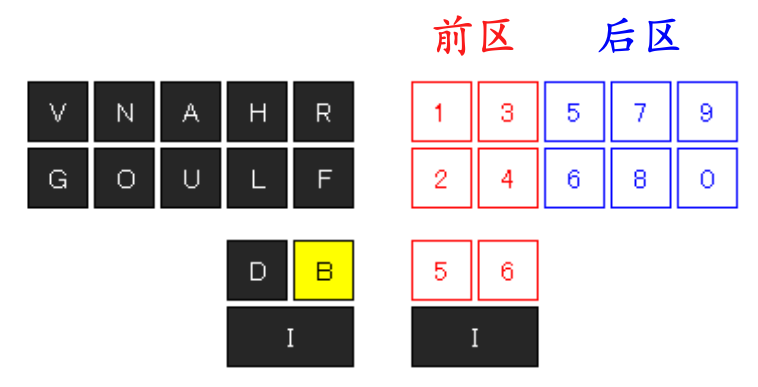
对于前区而言,已经有 6 个单键数字(1~6),剩余的 4 个数字及逗点、句点则由这 6 个单键数字组合而成,如下图所示:
On the first half, there are already 6 digit keys (1–6); the remaining 4 digits, as well as the comma and decimal point, can be written with some combination of them:
| 7 |
8 |
9 |
0 |
, |
. |
1 |
BF |
BH |
BL |
DL |
HL |
BD |
HD |
| 5-2 |
5-3 |
5-4 |
6-4 |
3-4 |
5-6 |
3-6 |
注:如果嫌单键数字 1 太远不好打,则可以使用组合键 HD 代替。
对于后区而言,同样已经有 6 个单键数字(5~9、0),剩余的 4 个数字及逗点、句点则由这 6 个单键数字组合而成,如下图所示:
Note: If you find the 1 key too far or difficult to press, you may also use HD.
The second half similarly has six digits (5–9 and 0); the remaining four digits, as well as the comma and decimal point, can be written with a combination of them:
| 1 |
2 |
3 |
4 |
, |
. |
9 |
AN |
UO |
AO |
NG |
ANG |
UOG |
OG |
| 5-7 |
6-8 |
5-8 |
7-0 |
5-7-0 |
6-8-0 |
8-0 |
注:如果嫌单键数字 9 太远不好打,则可以使用组合键 OG 代替。
前后两区同时进行,就可以一击录入两位数字。例如:
Note: If you find the 9 key too far or difficult to press, you may also use OG.
By using both zones at the same time, you can write two digits with one stroke. For example:
B:FG |
B:RAO |
B:RNG |
B:HAO |
B:LNG |
B:BHG |
B:BHN |
| 20 |
13 |
14 |
34 |
43 |
80 |
87 |
| 爱你 |
一生 |
一世 |
生生 |
世世 |
不离 |
不弃 |
同理,连续录入时左手可一直按住不动,只要右手相应变化即可。
三、全角数字
对于文本数字而言,无论单数模式还是双数模式,除了上述介绍的半角数字,还能录入全角数字,只要将左手功能键换成 NOG 或 BDF 即可。譬如:左手按住 NOG 或 BDF,右手依次输入 HUOG、RNG、RA、BLUO、U,则可得到圆周率π的近似值的全角形式。
>3.1415926
全角数字是以直击字词的形式出现的,它不会进行智能组合。
现将单键数字、文本数字、单数模式、双数模式、全角模式、半角模式综合列表如下,以便对比记忆。
Similarly, you can write continuously by keeping your left hand stationary; only your right hand needs to move.
3. Full-width Numerals
In addition to the half-width numerals shown above, you can also write full-width numerals simply by replacing the left-hand designator B: with either NOG: or BDF:. For instance, by holding NOG: or BDF: with your left hand while entering :HUOG, :RNG, :RA, :BLUO, and :U in sequence, you get the full-width representation of the first 8 digits of π:
>3.1415926
Full-width numerals appear as literal characters and do not undergo conversion.
A comprehensive list of keyboard digits and textual digits in both single- and double-digit input modes and full-width and half-width modes is shown below to aid in memorization.
半角
Half
width |
全角
Full
width |
单键数字
Keyboard
digits |
文本单数
Textual single digits |
双数(前区)
Textual double digits
(First digit) |
双数(后区)
Textual double digits
(Last digit) |
半角
Half width |
全角
Full width |
半角
Half width |
全角
Full width |
半角
Half width |
全角
Full width |
| 1 |
1 |
:R |
B:R |
NOG:R |
B:R |
NOG:R |
B:AN |
NOG:AN |
| 2 |
2 |
:F |
B:F |
NOG:F |
B:F |
NOG:F |
B:UO |
NOG:UO |
| 3 |
3 |
:H |
B:H |
NOG:H |
B:H |
NOG:H |
B:AO |
NOG:AO |
| 4 |
4 |
:L |
B:L |
NOG:L |
B:L |
NOG:L |
B:NG |
NOG:NG |
| 5 |
5 |
:A |
B:A |
NOG:A |
B:B |
NOG:B |
B:A |
NOG:A |
| 6 |
6 |
:U |
B:U |
NOG:U |
B:D |
NOG:D |
B:U |
NOG:U |
| 7 |
7 |
:N |
B:N |
NOG:N |
B:BF |
NOG:BF |
B:N |
NOG:N |
| 8 |
8 |
:O |
B:O |
NOG:O |
B:BH |
NOG:BH |
B:O |
NOG:O |
| 9 |
9 |
:V |
B:V |
NOG:V |
B:BL |
NOG:BL |
B:V |
NOG:V |
| 0 |
0 |
:G |
B:G |
NOG:G |
B:DL |
NOG:DL |
B:G |
NOG:G |
上表的 NOG 可全部用下表的 BDF 替代,二者等效
NOG: outlines above are interchangeable with BDF: outlines below
|
| 1 |
1 |
:R |
B:R |
BDF:R |
B:R |
BDF:R |
B:AN |
BDF:AN |
| 2 |
2 |
:F |
B:F |
BDF:F |
B:F |
BDF:F |
B:UO |
BDF:UO |
| 3 |
3 |
:H |
B:H |
BDF:H |
B:H |
BDF:H |
B:AO |
BDF:AO |
| 4 |
4 |
:L |
B:L |
BDF:L |
B:L |
BDF:L |
B:NG |
BDF:NG |
| 5 |
5 |
:A |
B:A |
BDF:A |
B:B |
BDF:B |
B:A |
BDF:A |
| 6 |
6 |
:U |
B:U |
BDF:U |
B:D |
BDF:D |
B:U |
BDF:U |
| 7 |
7 |
:N |
B:N |
BDF:N |
B:BF |
BDF:BF |
B:N |
BDF:N |
| 8 |
8 |
:O |
B:O |
BDF:O |
B:BH |
BDF:BH |
B:O |
BDF:O |
| 9 |
9 |
:V |
B:V |
BDF:V |
B:BL |
BDF:BL |
B:V |
BDF:V |
| 0 |
0 |
:G |
B:G |
BDF:G |
B:DL |
BDF:DL |
B:G |
BDF:G |
第三节 文本字母
文本字母是以文本形式录入的字母。与文本数字同理,文本字母不会直接录入到焦点程序中,而是保留在缓冲行上参与智能联想,让输入法自动提示相关单词,以尽可能减小速录师的反应负担。
一、半角字母
文本字母与键盘字母的编码一致,只是左手功能键不同,右手部分则完全相同。
15–3 Text Letters
Textual letters are letters written in text format. Much like textual numbers, they are not inserted into the application, but rather remain on a buffer to allow for conversion and prediction, minimizing the cognitive load on the stenographer.
1. Half-width Letters
Text letters are written the same way as their keyboard equivalents, except for using different designators on the left hand.
| 小写文本字母 Lowercase Letters |
大写文本字母 Uppercase Letters |
编码
Outline |
字母
Letter |
编码
Outline |
字母
Letter |
编码
Outline |
字母
Letter |
编码
Outline |
字母
Letter |
IF:A | a | IF:DL | n |
IH:A | A | IH:DL | N |
IF:B | b | IF:O | o |
IH:B | B | IH:O | O |
IF:DRF | c | IF:BR | p |
IH:DRF | C | IH:BR | P |
IF:D | d | IF:BDH | q |
IH:D | D | IH:BDH | Q |
IF:N | e | IF:R | r |
IH:N | E | IH:R | R |
IF:F | f | IF:DF | s |
IH:F | F | IH:DF | S |
IF:HL | g | IF:DH | t |
IH:HL | G | IH:DH | T |
IF:H | h | IF:U | u |
IH:H | H | IH:U | U |
IF:G | i | IF:BHL | v |
IH:G | I | IH:BHL | V |
IF:BD | j | IF:BH | w |
IH:BD | J | IH:BH | W |
IF:RF | k | IF:BDL | x |
IH:RF | K | IH:BDL | X |
IF:L | l | IF:BL | y |
IH:L | L | IH:BL | Y |
IF:BF | m | IF:DR | z |
IH:BF | M | IH:DR | Z |
连续录入时,左手可一直按住不动,只要右手相应变化即可。
例如,左手一直按住 IF 键,右手连续输入整体编码 DF、DH,则输入法缓冲行会显示 st,且候选框会列出所有以此开头的单词,非常方便。
          >st
           study
           still
           state
           story
           states
           studies
           stuff
再如:左手一直按住 IH 键,右手连续输入整体编码 DRF、N,则输入法缓冲行会显示 CE,且候选框会列出所有以此开头的单词。
          >CE
           CEO
           CELLS
           CELL
           CENTURY
           CENTER
           CERTAIN
           CENTRAL
When writing continuously, your left hand can remain in place, and only the right hand needs to move to write each letter.
For example, if you hold down IF: with your left hand while pressing :DF then :DH with your right hand, the buffer line will display st, and the candidate list contains words beginning with those letters:
          >st
           study
           still
           state
           story
           states
           studies
           stuff
Another example: if you hold down IH: with your left hand while pressing :DRF and :N with your right hand, the buffer line will display CE, and the candidate list contains words beginning with those letters:
          >CE
           CEO
           CELLS
           CELL
           CENTURY
           CENTER
           CERTAIN
           CENTRAL
二、配套标点
字母还具有配套的标点符号,其形态和编码同一般符号(见第六章、第十七章)基本一致,只不过左手多了功能键而已,且其功能键与各类字母的功能键相同。
2. Punctuation
The letters also have corresponding punctuation symbols. Their forms are consistent with those of general symbols (see Chapter 6 and Chapter 17), with the only difference being that the designators of the left hand are the same as for letters.
名称
Name |
符号
Symbol |
文本字母 Textual Symbols |
键盘字母 Keyboard Symbols |
小写
Half-width |
大写
Full-width |
小写
Half-width |
大写
Full-width |
逗号
comma | , |
IF:dou | IH:dou |
BG:dou | INO:dou |
句号
full stop | . |
IF:ju | IH:ju |
BG:ju | INO:ju |
冒号
colon | : |
IF:mao | IH:mao |
BG:mao | INO:mao |
分号
semicolon | ; |
IF:fen | IH:fen |
BG:fen | INO:fen |
反问号
question mark | ? |
IF:FG | IH:FG |
BG:FG | INO:FG |
感叹号
exclamation mark | ! |
IF:tan | IH:tan |
BG:tan | INO:tan |
引号
quotation mark | " |
IF:yin | IH:yin |
BG:yin | INO:yin |
单引号
apostrophe | ' |
IF:dan | IH:dan |
BG:dan | INO:dan |
省略号
ellipsis | ... |
IF:sheng | IH:sheng |
BG:sheng | INO:sheng |
破折号
em dash | — |
IF:po | IH:po |
BG:po | INO:po |
短破折
en dash | – |
IF:duan | IH:duan |
BG:duan | INO:duan |
连字符
hyphen | - |
IF:lian | IH:lian |
BG:lian | INO:lian |
下划线
underscore | _ |
IF:xian | IH:xian |
BG:xian | INO:xian |
竖杠
vertical bar | | |
IF:gang | IH:gang |
BG:gang | INO:gang |
斜杠
forward slash | / |
IF:xie | IH:xie |
BG:xie | INO:xie |
反斜杠
backslash | \ |
IF:fan | IH:fan |
BG:fan | INO:fan |
星号
asterisk | * |
IF:xing | IH:xing |
BG:xing | INO:xing |
井号
number sign | # |
IF:jing | IH:jing |
BG:jing | INO:jing |
安德
ampersand | & |
IF:an | IH:an |
BG:an | INO:an |
艾特
at | @ |
IF:ai | IH:ai |
BG:ai | INO:ai |
波浪
tilde | ~ |
IF:bo | IH:bo |
BG:bo | INO:bo |
脱字符
caret | ^ |
IF:tuo | IH:tuo |
BG:tuo | INO:tuo |
点
dot | . |
IF:dian | IH:dian |
BG:dian | INO:dian |
间隔号
middle dot | · |
IF:IH | IH:IH |
BG:IH | INO:IH |
左括号
left parenthesis | ( |
IF:IB | IH:IB |
BG:IB | INO:IB |
右括号
right parenthesis | ) |
IF:ID | IH:ID |
BG:ID | INO:ID |
譬如:左手一直按住 IH 键,右手连续输入 DH、BDLOG(xie)、A,则可打出 N/A。
三、全角字母
与文本数字类似,文本字母不仅有大小写之分,也有全半角之分。
全角字母与半角字母的编码一致,区别只在于左手功能键不同,右手部分则完全相同。下表将键盘字母和大小写文本字母的全半角编码都列在一起,便于大家比对。
For example, if you hold down IH: with your left hand, and write :DH, :BDLOG (:xie), and :A with your right hand, you write "N/A".
3. Full-width Letters
Much like textual numerals, textual letters are distinguish not only by case (uppercase or lowercase) but also by width (full- or half-width).
Full-width letters are written the same way as half-width letters, except with a different designator. The table below lists the outlines for both full- and half-width versions for all uppercase and lowercase letters, including their corresponding keyboard outlines for easy comparison.
编码
Outline |
小写
Lowercase |
大写
Uppercase |
左手
Left hand |
右手
Right hand |
半角
Half-width |
全角
Full-width |
半角
Half-width |
全角
Full-width |
小写文本字母
Lowercase textual letters |
A | a | a | A | A |
B | b | b | B | B |
半角
Half-width
IF |
全角
Full-width
IFL |
DRF | c | c | C | C |
D | d | d | D | D |
N | e | e | E | E |
F | f | f | F | F |
HL | g | g | G | G |
H | h | h | H | H |
|
G | i | i | I | I |
大写文本字母
Uppercase textual letters |
BD | j | j | J | J |
RF | k | k | K | K |
半角
Half-width
IH |
全角
Full-width
IHR |
L | l | l | L | L |
BF | m | m | M | M |
DL | n | n | N | N |
O | o | o | O | O |
BR | p | p | P | P |
BDH | q | q | Q | Q |
|
R | r | r | R | R |
键盘字母
Keyboard letters |
DF | s | s | S | S |
DH | t | t | T | T |
BG |
INO |
U | u | u | U | U |
BHL | v | v | V | V |
BH | w | w | W | W |
BDL | x | x | X | X |
大小写互逆
Case toggle |
BL | y | y | Y | Y |
DR | z | z | Z | Z |
与全角数字一样,全角字母也是以直击字词的形式出现,它不会进行智能组合。
Much like full-width numerals, full-width letters are committed directly to the document and do not undergo any conversion.
第十六章 座次-剪贴-组词定词
如何快速准确地录入与会人员的称号姓名、如何高效利用复制粘贴来巧妙录入预设内容……这都是一名合格速录师应该掌握的技巧。本章即将介绍的悬浮座次图和超级剪贴板,正是为此而设的专业功能。此外,本章还将介绍标消词定字(以词定字)的对标功能组词定词(以词定词)。
第一节 悬浮座次图
到现场做会议记录的速录师,经常会遭遇这样一种棘手情形——发言者众多,讲话人频繁变换,有的要即席发表意见,毫无次序可言,有的会反复多次讲话,空间跳跃性大,尤其是诸如圆桌会、讨论会、座谈会之类的会议。在这种场合下做会议记录难度之大可想而知,且不说速录师是否能够完整记录每个人的讲话,仅仅是及时而准确地录入发言人的姓名就是个不小的挑战。即便是已经提前造词也会由于一时反应卡壳而导致措手不及,更何况还会经常因为视角受限而看不到演讲者的姓名台卡。
此时若有一个事先记录了与会者姓名及其位置的清晰座次图,并通过位置次序来录入其姓名,那将是何等美事?有鉴于此,我们特意打造了一款称手利器——悬浮座次图。
16 Seating Chart, Clipboard, and Word-based Selection
Writing the titles and names of attendees and efficiently copying and pasting preset content are essential skills that a proficient stenographer must master. The floating seating chart and clipboard features, which will be introduced in this chapter, are professional tools designed specifically for these purposes. This chapter also introduces the word-based character and word selection features.
16–1 Floating Seating Chart
Stenographers taking minutes frequently come across an especially difficult situation: several speakers, often speaking in quick succession, some offering remarks on the spot with seemingly no order, and others speaking repeatedly and frequently changing topics. This is especially common in meetings and conferences. It follows that taking minutes in these settings is quite difficult, both because the stenographer has to record every person's remarks in their entirety, and because even just writing speakers' names accurately and quickly poses a challenge. Even with predefined shortcuts, a stenographer can lose their place with even a momentary lapse in reaction time, and often not being able to see speakers' name plates makes this even more difficult.
Wouldn't it be nice to have a clear seating chart with the names of all attendees that allows you to write names simply based on the seating order? With this in mind, we have designed a convenient and powerful tool: the floating seating chart.
While many of the content in this section is to do with software features, it may be useful to reuse the outlines for speaker identification in text.
一、打开座次
1. Opening the Seating Chart
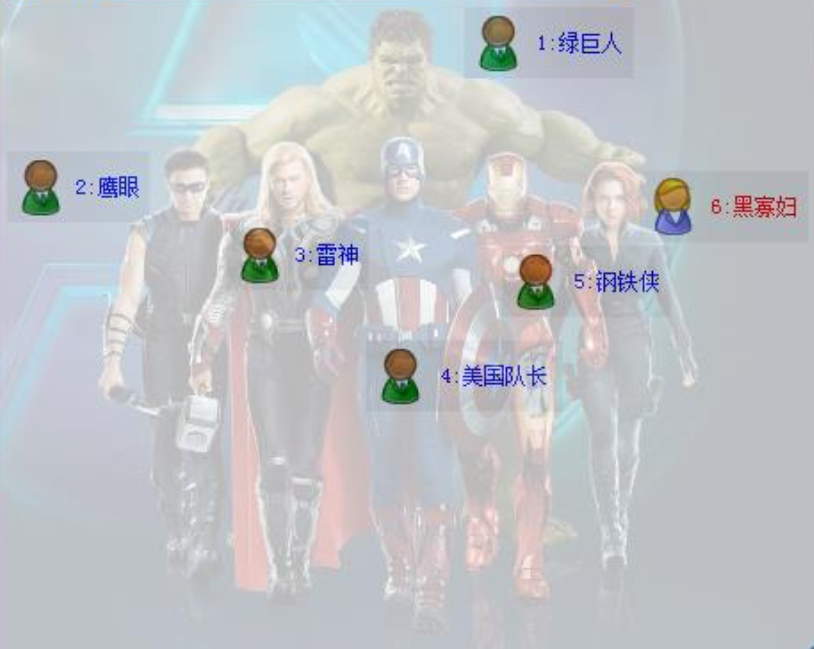
This section has been omitted due to being irrelevant to theory. However, the example seating chart below is relevant for later sections:
二、姓名直击
座次图除了可以清晰明了地显示与会者的姓名和位置,更主要的是用来快速录入发言者的姓名或头衔,具体有两种录入方法:
1. 序号直击
序号直击就是通过排位序号来录入,功能键为 BUOG:数字序号
比如上图中的“钢铁侠”,可用 BUOG:5 来录入,录入结果如下图所示:
>钢铁侠 钢铁侠:
请注意,若座次序号为 10 以上,则录入时右手需要使用双数字打法。
2. 音节直击
音节直击则是通过姓名首字的音节来录入,功能键为 首字音节:BUOG
比如上图中的“黑寡妇”,可用 hei:BUOG 来录入。
>黑寡妇 黑寡妇:
不难发现,无论用哪种方式录入,输入条缓冲行上都会显示带冒号和不带冒号两个候选项以供选择。
如果有两个以上的姓名首字读音相同,则通过音节直击的方式录入时,所有符合条件的姓名都会显示为候选项,并按照其数字序号先后排列。譬如:假若在刚才的座次图上加上一个“雷公”的话,那么在输入 lei:BUOG 后,输入条缓冲行上将显示为下图的样子:
>雷神 雷神: 雷公 雷公:
2. Direct Name Input
In addition to clearly showing the names and seating positions of attendees, the seating chart enables the quick entry of speakers' names or titles. There are two ways to do this:
1. Position Input
Position input allows you to write people's names using their numbered position in the chart. The outline is BUOG: then the number.
For example, to write 钢铁侠 (Iron Man) from the seating chart above, you can write BUOG:5, and the candidate window shows the following:
>钢铁侠 钢铁侠:
Note that for numbers higher than 10, the right hand must be written with double-digit input.
2. Phonetic Input
Phonetic name input allows you to write names based on the first character. The outline is the phonetic chord then :BUOG.
For example, to write 黑寡妇 (Black Widow), you can write hei:BUOG.
>黑寡妇 黑寡妇:
As you can see, regardless of the input method used, there will always be two candidate options: one with a colon, and one without.
If two or more names share the same pronunciation for their initial characters, then all matching names will be displayed as candidates when written phonetically, arranged according to their positions in the chart. For example, if we were to add 雷公 to the seating chart above, writing lei:BUOG would now show the following candidates:
>雷神 雷神: 雷公 雷公:
录入方法
Input method |
编码
Outline |
左手
Left hand |
右手
Right hand |
序号直击
Position input |
BUOG |
数字序号
Position
number |
音节直击
Phonetic input |
首字音节
First syllable
phonetic |
BUOG |
三、添加姓名
四、插入座次图
3. Adding Names
4. Exporting the Seating Chart
These sections have been omitted due to being irrelevant to theory.
第二节 超级剪贴板
在实际工作中,速录师偶尔会遇到来回交叉地复制、粘贴不同内容的情形,但系统剪贴板默认只支持同一内容的复制粘贴。 微软的 Word 程序虽然支持不同内容的复制粘贴,但需要用鼠标点选,且仅限其内部使用。而速录师为了稳定起见,往往使用轻量级的记事本等文本编辑器作为工作软件,所以在遇到上述情形时也毫无良策,只能用笨办法来应对。为此,我们开发了一种超级剪贴板功能,可以支持最多 50 个不同文本内容的交叉复制粘贴,且自带透明效果。
剪贴板默认处于关闭状态,按功能键 HANV:HANV 即可开启。
每次刚打开剪贴板时只有一行,每复制一个内容到剪贴板就会增加一行,直到占满全部 50 行为止。用法如下:
一、复制内容
将文字复制到剪贴板上有两种方式:一是将文字先录入到缓冲行上,然后按功能键;二是清空缓冲行,选中已经上屏的文字,然后按功能键。注意,使用第二种方式必须先确保输入条缓冲行上没有任何内容,否则就只能按第一种方式执行。功能键如下表所示:
12 Super Clipboard
Stenographers often encounter situations that require copying and pasting several pieces of text, but the system clipboard only supports copying and pasting one item at a time. Although Microsoft Word does support copying and pasting multiple items, this requires mouse operation and is strictly confined to within the application. Stenographers also often rely on lightweight text editors like Notepad; when faced with that scenario, they are left without an efficient solution and are forced to resort to cumbersome workarounds. As such, we have developed a Super Clipboard feature capable of supporting copying and pasting up to 50 distinct pieces of text.
The clipboard is disabled by default; write HANV:HANV to enable it.
When the clipboard is first opened, it displays only a single line. Each time content is copied, an additional line is added until all 50 lines are filled. Below are instructions on using it:
1. Copying Text
There are two ways to copy text to the clipboard. The first involves writing text to the input buffer, then writing the copy outline; the second involves clearing the buffer, selecting text already on screen, and then writing the copy outline. Note that when using the second method, you must first ensure that the buffer is completely empty, otherwise the first method will be used. The outlines for copying are below:
功能键
Outline |
作用 Action |
RANV:1 | 复制文字内容到剪贴板第 1 行
Copy text to clipboard slot 1 |
RANV:2 | 复制文字内容到剪贴板第 2 行
Copy text to clipboard slot 2 |
RANV:3 | 复制文字内容到剪贴板第 3 行
Copy text to clipboard slot 3 |
| ... | ... |
RANV:49 | 复制文字内容到剪贴板第 49 行
Copy text to clipboard slot 49 |
RANV:50 | 复制文字内容到剪贴板第 50 行
Copy text to clipboard slot 50 |
注:若剪贴板未开启,则直接按上面的复制文本功能键,可自动开启剪贴板。
值得一提的是,用第二种方式还支持分段内容的复制。分段内容在剪贴板上是作为一整段显示的,但粘贴的时候会还原成分段格式。
二、粘贴内容
与复制相对应,把剪贴板上的内容粘贴到工作软件中也有十个功能键。
If the clipboard is not already enabled, pressing one of the outlines above will automatically enable it.
Notable, the second method also supports copying segmented content. While such content appears as one continuous line on the clipboard, it retains its format when pasted.
2. Pasting Text
There are also outlines dedicated to pasting content from the clipboard into the application:
功能键
Outline |
作用 Action |
HANV:1 | 把剪贴板第 1 行文字内容粘贴到目标位置
Paste text from clipboard slot 1 |
HANV:2 | 把剪贴板第 2 行文字内容粘贴到目标位置
Paste text from clipboard slot 2 |
HANV:3 | 把剪贴板第 3 行文字内容粘贴到目标位置
Paste text from clipboard slot 3 |
| ... | ... |
HANV:49 | 把剪贴板第 49 行文字内容粘贴到目标位置
Paste text from clipboard slot 49 |
HANV:50 | 把剪贴板第 50 行文字内容粘贴到目标位置
Paste text from clipboard slot 50 |
注意,复制和粘贴的右手部分都是相同的数字,但左手部分是两个不同的功能键。复制的左手功能键是 RANV,粘贴的左手功能键是 HANV。
三、缩放移动
Note that the right-hand sides of both copy and paste outlines consist of the same numbers, but the designators on the left hand are different. Copying uses the designator RANV:, while pasting uses HANV:.
3. Resizing and Moving
This section has been omitted due to being irrelevant to theory.
注意,剪贴板上的内容具有临时性,关闭程序后就会自动被清空,每次重启速录程序,剪贴板都会随之重置。在不重启程序的前提下,我们也可按功能键 RANV:RANV 清空并关闭剪贴板。
Note that the clipboard contents are temporary and are automatically cleared when the program is closed. This also means the clipboard is reset every time the program is started. However, you can also clear and close the clipboard using the outline RANV:RANV.
作用
Operation |
编码
Outline |
左手
Left hand |
右手
Right hand |
复制内容
copy text |
RANV |
剪贴板行号
slot number |
粘贴内容
paste text |
HANV |
清空剪贴板
clear clipboard |
RANV |
RANV |
第三节 组词定词
日常交流中,我们经常会遇到这样一种情况,即只听清了发音,却不知道具体对应哪两个字,或者说一时反应不过来。比如:当初次听到“阑珊”一词时,也许有的人并不清楚具体是哪两个字,但若进一步解释为:
16–3 Word-based Selection
In everyday conversation, we often encounter situations where we know the pronunciation of a word but not exactly which characters it is written with, or perhaps we cannot recall them in the moment. For instance, when hearing the term 阑珊 for the first time, you may not immediately recognize the specific characters, but if it's explained as:
阑尾的阑
the 阑 in 阑尾 |
以陌生词语的前字组词,且该字位于新组成词语的词首
using the first character of a known word
as the first character of the new word |
珊瑚的珊
the 珊 in 珊瑚 |
以陌生词语的后字组词,且该字位于新组成词语的词首
using the first character of a known word
as the last character of the new word |
这样是不是就茅塞顿开了?再如:当初次听到“摆烂”一词时,我们也许又会发懵,但若进一步解释为:
Would this not immediately clear things up? Take another example: when we hear the term 摆烂, we may be confused, but if it is further explained as:
摇摆的摆
the 阑 in 阑尾 |
以陌生词语的前字组词,且该字位于新组成词语的词尾
using the last character of a known word
as the first character of the new word |
腐烂的烂
the 珊 in 珊瑚 |
以陌生词语的后字组词,且该字位于新组成词语的词尾
using the last character of a known word
as the last character of the new word |
这样是不是就恍然大悟了?
上述情形在速录过程中显然不会遇到,因为讲话人的直接受众并非速录师,他并不关心你是否知道当前所讲的话具体对应的是哪些文字,更不可能专门向你作一通解释。即便你真的不知道,或者自以为知道但实际上却是错误的,也都无关紧要。因为只要你听清并打对了拼音,输入法就会自动显示出相应的字词,基本不存在“提笔忘字”的尴尬。
但这并不妨碍我们从中受到启发,增设一个可以在某些特定情况下方便地筛选同音词语的功能——组词定词(简称“组定”),其定义如下:
Does this not also make it understandable?
The aforementioned scenario is never encountered when writing stenography, since the speaker is not directly speaking to the stenographer; the speaker does not care whether you know what characters correspond to the words they are saying, nor should they pause to explain them to you. Even if you genuinely do not know, it ultimately does not matter, since as long as you can clearly hear the words and write the Pinyin, the system automatically shows the correct characters and words, eliminating the issue of character amnesia.
However, this did not stop us from creating a feature inspired by this, one that allows you to disambiguate homophones under specific circumstances. We call this word-based selection, and it works as follows:
选择用哪个字组词
position in target word |
前字
first character |
后字
last character |
以之为首还是结尾
position in familiar word |
为首
beginning |
结尾
end |
为首
beginning |
结尾
end |
功能键的具体编码
designator |
FUOG: |
:FUOG |
LUOG: |
:LUOG |
功能键的相应名称
designator name |
前首
first-as-head |
前尾
first-as-tail |
后首
last-as-head |
后尾
last-as-tail |
The names here can get confusing, but: "first-as-head" means the first character of the new word is being disambiguated by using it as the head of a different word, etc.
直白解释就是,用功能键 FUOG 代替目标词语的前字,用功能键 LUOG 代替目标词语的后字,然后任选其一来组词,组一个更加直观的新词。无论选前字还是后字,若其位于新词开头,则用左手功能键代替,若其位于新词结尾,则用右手功能键代替。听起来虽然有点绕,实际上并不费解。我们不妨举几个例子来说明其具体使用方法。
This method involves using the designator FUOG to represent the first character of a target word, and LUOG to represent the last character. You can select one of these to combine with other elements to form a new, more intuitive word. Regardless of which character you choose, if it appears at the start of the new word, you should use your left hand to write it, and if it appears at the end, you should use your right hand. This may sound complicated, but it's quite easy. Let's look at some examples.
一、不同目标词语筛选演示
1. 用“前首”功能筛选词语“甲胄”
第一击:先录入“甲胄”的音节码,发现其不是首选词,如下图所示:
>加州 甲冑 嘉州 加洲 家周 假舟
第二击:用“前首”功能键左手 FUOG 代替“甲”字,组一个更直观的新词“甲方”,即直接录入 FUOG:fang,便可将目标词语“甲胄”一击筛选出来。如下图所示:
>甲冑 家周
1. Selecting for Different Target Words
Example 1. Select 甲胄 using first-as-head input
In the first stroke, write 甲胄 phonetically (jia:zhou), and see that it's not the first candidate:
>加州 甲冑 嘉州 加洲 家周 假舟
In the second stroke, use the first-as-head designator FUOG: to select for 甲, using the word 甲方. By writing FUOG:fang, you can immediately select the target word in one stroke:
>甲冑 家周
BD A : B H U O
F U OG : F A N G 甲冑
2. 用“前尾”功能筛选词语“滥觞”
第一击:先录入“滥觞”的音节码,发现其不是首选词,如下图所示:
>栏上 滥觞 栏商 揽上
第二击:用“前尾”功能键右手 FUOG 代替“滥”字,组一个更直观的新词“泛滥”,即直接录入 fan:FUOG,便可将目标词语“泛滥”一击筛选出来。如下图所示:
>滥觞
Example 2. Selecting for 滥觞 using first-as-tail input
In the first stroke, write 滥觞 phonetically (lan:shang), and see that it's not the first candidate:
>栏上 滥觞 栏商 揽上
In the second stroke, use the first-as-tail designator :FUOG to select for 滥, using the word 泛滥. By writing fan:FUOG, you can immediately select the target word in one stroke:
>滥觞
LA N : B LA N G
F A N : F U OG 滥觞
3. 用“后首”功能筛选词语“岐黄”
第一击:先录入“岐黄”的音节码,发现其不是首选词,如下图所示:
>凄惶 气荒 七皇 栖凰 岐黄 歧黄
第二击:用“后首”功能键左手 LUOG 代替“黄”字,组一个更直观的新词“黄金”,即直接录入 LUOG:jin,便可将目标词语“岐黄”一击筛选出来。如下图所示:
>岐黄 歧黄
Example 3. Selecting for 岐黄 with last-as-head input
In the first stroke, write 岐黄 phonetically (qi:huang), and see that it's not the first candidate:
>凄惶 气荒 七皇 栖凰 岐黄 歧黄
In the second stroke, use the last-as-head designator LUOG: to select for 黄, using the word 后首. By writing LUOG:jin, you can immediately select the target word in one stroke:
>岐黄 歧黄
BD H :I H N
L U OG : BD N 岐黄
4. 用“后尾”功能筛选词语“式微”
第一击:先录入“式微”的音节码,发现其不是首选词,如下图所示:
>市委 视为 是为 示威 侍卫 实为
第二击:用“后尾”功能键右手 LUOG 代替“微”字,组一个更直观的新词“稍微”,即直接录入 shao:LUOG,便可将目标词语“泛滥”一击筛选出来。如下图所示:
>式微 视为 是为 实为 施为 誓为
Example 4. Selecting for 式微 with last-as-tail input
In the first stroke, write 式微 phonetically (shi:wei), and see that it's not the first candidate:
>市委 视为 是为 示威 侍卫 实为
In the second stroke, use the last-as-tail designator :LUOG to select for 微, using the word 稍微. By writing shao:LUOG, you can immediately select the target word in one stroke:
>式微 视为 是为 实为 施为 誓为
IB L : U OG
B LA O : L U OG 式微
二、相同目标词语筛选演示
譬如欲录入“史记”一词,因其词频相对不高,若按笨办法录入,需先翻页再选择,非常不便。但若借助组词定词功能,则可有效减少击键次数。
第一击:先录入“史记”的音节码;
>实际 世纪 十几 时机 市级 事迹
第二击:分别用组词定词的四个功能键来筛选。
1. “前首”筛选
用左 FUOG 代替“史”,组一个更直观的新词“史学” ,即直接录入 FUOG:xue,便可一击筛出“史记” 。如下图所示:
>史记 史籍 史迹 史绩 史集 史藉
2. “前尾”筛选
用右 FUOG 代替“史”,组一个更直观的新词“历史”,即直接录入 li:FUOG,便可一击筛出“史记” 。如下图所示:
>史记 史籍 史迹 史绩 史集 史藉
3. “后首”筛选
用左 LUOG 代替“记”,组一个更直观的新词“记录”,即直接录入 LUOG:lu,便可一击筛出“史记” 。如下图所示:
>史记 识记 事记 是记 使记 失记
4. “后尾”筛选
用右 LUOG 代替“记”,组一个更直观的新词“日记”,即直接录入 ri:LUOG,便可一击筛出“史记” 。如下图所示:
>史记 识记 事记 是记 使记 失记
2. Selecting for Similar Target Words
Let's use 史记 as an example. Given its relatively low frequency, you would need to flip through multiple pages to write it the conventional way, which is very inconvenient. By using the word-based selection feature, we can significantly reduce the number of strokes needed.
In the first stroke, write 史记 phonetically (shi:ji):
>实际 世纪 十几 时机 市级 事迹
The second stroke can use any of the four designators for selection:
1. First-as-head
Use FUOG: to select for 史, using the word 史学. Writing FUOG:xue returns an exact match:
>史记 史籍 史迹 史绩 史集 史藉
2. First-as-tail
Use :FUOG to select for 史, using the word 历史. Writing li:FUOG returns an exact match:
>史记 史籍 史迹 史绩 史集 史藉
3. Last-as-head
Use LUOG: to select for 记, using the word 记录. Writing LUOG:lu returns an exact match:
>史记 识记 事记 是记 使记 失记
4. Last-as-tail
Use :LUOG to select for 记, using the word 日记. Writing ri:LUOG returns an exact match:
>史记 识记 事记 是记 使记 失记
IB L : BD
F U OG : BD L U OG 史记
IB L : BD
I L : F U OG 史记
IB L : BD
L U OG : L U 史记
IB L : BD
I R : L U OG 史记
上述示例中的目标词语均可用辅助码很方便地筛选出来,之所以选择它们,纯粹就是为了便于演示组定功能。从思维角度和反应时间上来讲,组定功能多少有点别扭,明显比辅助码更绕弯子更烧脑。另外请注意,应用组定功能筛选同音词时,我们并不能保证肯定就一击必中。因为它与新组词语的选择是有关系的,若选择不当,结果仍会存在其他同音词。试错是难免的,经验的积累是需要付出代价的。所以,如非迫不得已勿轻易用此功能。只有当某个词语用其他录入方法确实都很不方便时,再考虑此功能。
The target words in the examples above can be conveniently selected using auxiliary chords; we used them here only to demonstrate the word-based selection feature. From the perspective of cognitive load and reaction time, word-based selection is distinctively more complicated and mentally taxing than auxiliary chords. Also note that when using word-based selection to filter homophones, there is no guarantee of an exact match, since the outcome depends on the specific words chosen. If the selection was not appropriate, the result may still contain other homophones. As such, we do not recommend using this unless absolutely necessary. It should only be considered when a specific word proves genuinely difficult to write in any other way.